


TikTok Ads Manager 2026: A Complete Guide to Campaign Setup and Budget Management
TikTok ads manager is the official advertising platform that enables businesses to create, manage, and optimize advertising campaigns on TikTok. As TikTok continues to grow as a powerful marketing and eCommerce channel, understanding how to use TikTok ads manager effectively has become essential for businesses looking to reach new audiences and drive measurable results.
In addition to campaign management, many advertisers are interested in understanding TikTok ads costs before launching their campaigns. Knowing how budgets work and what factors influence advertising expenses can help businesses allocate resources more efficiently. This guide explains the key features of TikTok Ads Manager, budget settings, and best practices for optimizing campaign performance.
What Is TikTok Ads Manager?
TikTok ads manager is TikTok’s centralized advertising platform designed for businesses, brands, and marketers. It allows users to launch campaigns, monitor performance, and make data-driven decisions from a single dashboard.
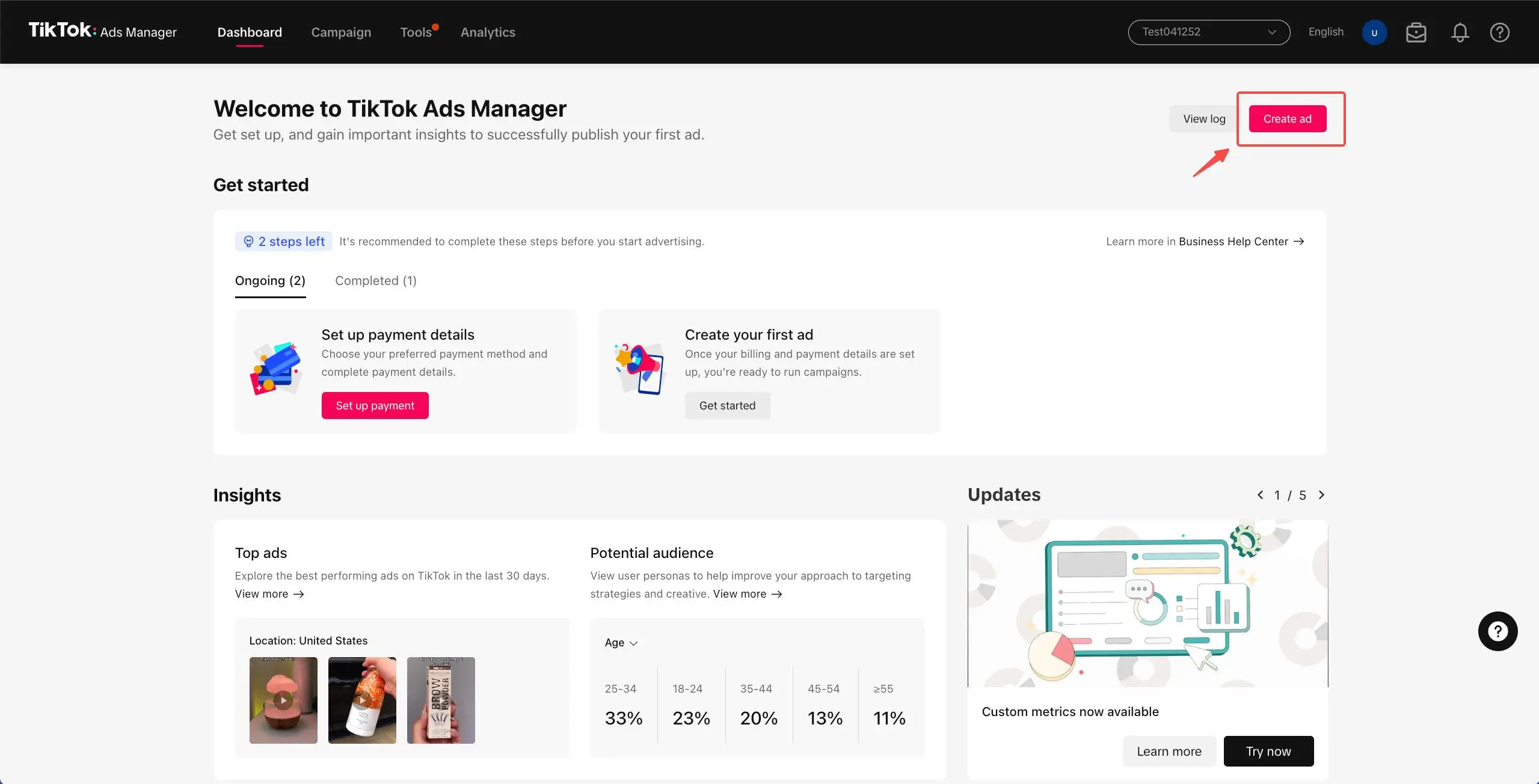
With TikTok ads manager, advertisers can:
- Create and launch advertising campaigns
- Define target audiences
- Manage budgets and bidding strategies
- Track campaign performance in real time
- Measure conversions and return on investment (ROI)
The platform provides comprehensive analytics that help businesses evaluate campaign effectiveness and identify opportunities for improvement.
Key Components of TikTok Ads Manager
To use TikTok ads manager effectively, it is important to understand its campaign structure.
Campaign Level
The campaign level is where advertisers select their primary advertising objective. Common objectives include:
- Traffic
- Video Views
- Lead Generation
- Website Conversions
- Sales
The selected objective directly influences how TikTok delivers and optimizes ads.
Ad Group Level
At the ad group level, advertisers can configure:
- Audience targeting
- Placement options
- Campaign schedule
- Budget allocation
- Bidding strategy
This level has a significant impact on both campaign performance and TikTok ads costs.
Ad Level
The ad level contains the creative assets that users see, including:
- Video content
- Images
- Ad copy
- Call-to-action buttons
High-quality creative content often leads to better engagement and conversion rates.
How to Set Up a Budget in TikTok Ads Manager
One of the most important features of TikTok ads manager is budget management. TikTok provides advertisers with flexible budget options to suit different campaign goals.
There are two primary budget types available:
Daily Budget
A Daily Budget represents the average amount an advertiser is willing to spend per day.
Benefits include:
- Better daily spending control
- Suitable for long-term campaigns
- Easy budget adjustments
Many businesses start with a Daily Budget to test performance before scaling campaigns.
Lifetime Budget
A Lifetime Budget represents the total amount allocated to a campaign over its entire duration.
Benefits include:
- Ideal for limited-time promotions
- Greater control over total spending
- Automated budget distribution across campaign dates
TikTok’s system automatically allocates spending based on performance opportunities while ensuring the total budget limit is not exceeded.
How TikTok Ads Costs Are Calculated
Understanding TikTok ads costs is critical for businesses planning their advertising strategy.

TikTok requires minimum budgets for campaign creation:
- Campaign-level minimum budget: $50
- Ad Group-level minimum budget: $20
However, actual advertising costs depend on several factors.
Industry Competition
Highly competitive industries generally experience higher CPM (Cost Per Mille) and CPC (Cost Per Click) rates due to increased advertiser demand.
Creative Quality
Engaging and relevant video content often reduces advertising costs by improving user engagement and campaign performance.
Audience Targeting
Narrow audience segments may require more optimization and data collection, potentially affecting campaign costs.
Bidding Strategy
Different bidding options, such as Cost Cap and Maximum Delivery, directly influence TikTok ads costs and campaign efficiency.
Best Practices to Optimize TikTok Ads Manager Performance
Using TikTok ads manager strategically can help businesses improve advertising performance while controlling costs.
Here are several recommended optimization practices:
Start With a Reasonable Budget
Avoid making significant budget increases immediately after launching a campaign. Allow TikTok’s algorithm enough time to gather data and optimize delivery.
Respect the Learning Phase
New campaigns enter a learning phase during which TikTok analyzes user behavior and engagement patterns.
Frequent changes to:
- Audience targeting
- Budget settings
- Creative assets
may disrupt optimization and delay performance improvements.
Continuously Test Creatives
Instead of relying on a single advertisement, advertisers should test multiple variations.
Consider experimenting with:
- Different content angles
- Various calls-to-action
- Alternative video formats
Creative testing is one of the most effective ways to improve conversion rates and lower TikTok ads costs.
When Should Businesses Use TikTok Ads Manager?
TikTok ads manager is suitable for a wide range of marketing objectives, including:
- Brand awareness
- Lead generation
- TikTok Shop sales growth
- Website conversions
- Customer retargeting
For businesses looking to expand their eCommerce presence, combining advertising efforts with services such as:
can significantly improve overall campaign effectiveness and revenue growth.
Conclusion
TikTok Ads Manager is a powerful platform that enables businesses to launch, manage, and optimize advertising campaigns with precision. By understanding campaign structures, budget options, and the factors that influence TikTok ads costs, advertisers can make more informed decisions and maximize their return on investment. Effective budget management, continuous creative testing, and careful audience targeting are essential for long-term success on TikTok. As competition continues to increase, businesses that leverage TikTok Ads Manager strategically will be better positioned to attract new customers and drive sustainable growth. Whether your goal is brand awareness, lead generation, or eCommerce sales, TikTok Ads Manager provides the tools needed to achieve measurable results.
FAQ
Is TikTok Ads Manager free to use?
Yes. Creating a TikTok Ads Manager account is free. Advertisers only pay when they start running campaigns.
What are the minimum TikTok ads costs?
TikTok requires a minimum campaign budget of $50 and a minimum ad group budget of $20.
Should I choose a Daily Budget or a Lifetime Budget?
A Daily Budget is ideal for ongoing campaigns that require flexible spending control, while a Lifetime Budget is better suited for campaigns with a fixed schedule and total budget.
Is TikTok Ads Manager suitable for small businesses?
Yes. Small businesses can start with modest budgets, gather performance data, and gradually scale their advertising efforts.
How can I reduce TikTok ads costs?
Advertisers can lower costs by improving creative quality, refining audience targeting, testing multiple ad variations, and optimizing campaigns based on performance data.
Zafago Global – Digital Growth Partner
Zafago Global is a Performance Digital Marketing Agency dedicated to partnering with businesses to optimize strategies and drive sustainable revenue growth.
 Office: 21st Floor CMA Building 64 Connaught Road Central, Hong Kong 999077
 Hotline :(+84) 888-025-050
 Email: biz@zafagodigital.com
Set Up TikTok Business Manager and Control Who Has Access
13/11/2026[…] If you want to go deeper on campaign setup after your Business Center is ready, read our guide to TikTok Ads Manager. […]