
AI Video Dubbing and Translation for Global Advertising
AI video dubbing and translation helps businesses turn existing videos into multilingual content without recreating every version from scratch. For advertisers expanding into new markets, this can shorten the path from having one usable creative to preparing localized versions for different audiences.
Zafago Portal includes Dubbing & Translation within its AI Creation suite. Users can upload a source video or select one from their Video Library, choose one or more target languages and voices, replace existing subtitles, enable lip sync when the source video is suitable, and generate a dubbed version through one workflow.
The feature is designed for practical video localization rather than translation alone. Ecommerce brands, agencies, and international advertisers can use existing creative assets as the starting point for multilingual content while keeping account management and other advertising operations within the wider Zafago Portal ecosystem.
AI video dubbing and translation turns existing videos into multilingual content
AI video dubbing and translation adapts the spoken content of an existing video for another language while preserving its visual foundation. Zafago Portal combines video input, target-language selection, AI voice, subtitle replacement, and optional lip sync in one workflow, helping advertisers prepare localized creative without rebuilding the entire video production process.
Video localization traditionally involves several separate tasks.
A team may first transcribe the original dialogue, translate the script, find a speaker for the new language, record the voiceover, synchronize the audio with the original footage, recreate subtitles, and export another version.
That level of manual production remains useful when every creative element needs individual control. However, performance advertising often works differently.
Creative teams may need to test multiple messages, products, formats, and markets continuously. Repeating the complete production process for every language can make international creative testing slower.
Zafago Portal’s Dubbing & Translation feature provides another workflow.
Instead of starting again from an empty project, advertisers can use an existing video as the source and customize how the translated version should be produced.
| Dubbing & Translation feature | Purpose |
|---|---|
| Upload video | Use an existing video as the source |
| Video Library | Select an available video asset |
| Translate to | Choose the target language |
| Add language | Add additional translation languages |
| Voice | Select the voice for the translated version |
| Replace existing subtitles | Replace original subtitles with AI-generated translations |
| Lip-sync | Synchronize generated speech with visible lip movement |
| Generate | Process the configured dubbed video |
This makes localization part of a repeatable creative workflow rather than a completely separate production project.
Zafago Portal completes AI video dubbing in three simple steps
Zafago Portal organizes AI video dubbing into three main steps: upload or select a source video, customize the language and presentation settings, then generate the localized version. Users can manage the target language, AI voice, translated subtitles, and lip-sync options directly from the Dubbing & Translation workspace.
Step 1: Upload or select the source video
Open AI Creation > Dubbing & Translation inside Zafago Portal.
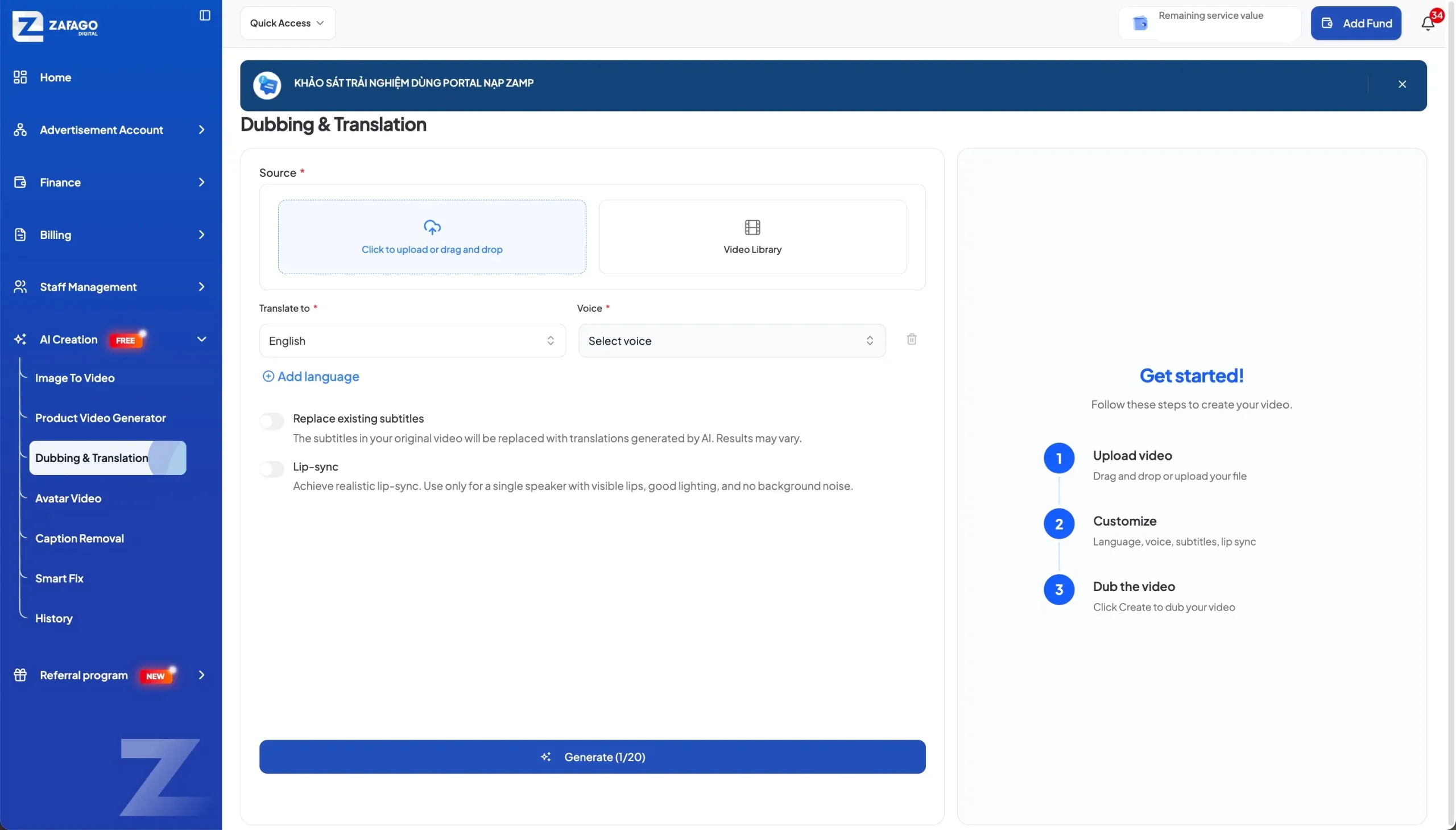
The first section is Source, where the video to be processed is selected.
Users have two starting options:
- Upload a video directly by clicking the upload area or using drag and drop.
- Select an existing asset through Video Library.
Using the Video Library can be convenient when creative assets have already been added to the Portal workflow. Direct upload is more suitable when working with a new source file.
The important point is that the localization process begins with an existing video.
For example, an ecommerce brand may already have a product demonstration or creator-style video that it wants to adapt for another market. Instead of filming the same visual sequence again, that video can become the source for the translated version.
Step 2: Select languages and AI voices
The next section controls how the translated video will sound.
Under Translate to, users select the target language. The interface also includes Add language, allowing additional language configurations to be added when more than one localized output is needed.
A Voice is then selected for the translated content.
This combination is particularly relevant to global advertising because localization involves more than replacing written text. Spoken-language content also needs to be understandable and appropriate for the target audience.
A business testing one video concept across different GEOs can therefore begin with one source asset and prepare different language configurations rather than building each video from the beginning.
This does not mean every translated version should automatically be published. Generated content should still be reviewed for pronunciation, terminology, product information, and overall communication quality.
Step 3: Configure subtitles and lip sync before generating
Zafago Portal provides two additional controls: Replace existing subtitles and Lip-sync.
When Replace existing subtitles is enabled, subtitles in the original video are replaced with translations generated by AI. The Portal itself notes that results may vary, so the final subtitles should be reviewed before publishing.
Lip sync is more dependent on the source footage.
According to the guidance displayed directly in Zafago Portal, the feature should be used with a single speaker with visible lips, good lighting, and no background noise.
That means a clear talking-head video is more appropriate for lip synchronization than footage with multiple speakers, hidden faces, poor lighting, or distracting audio.
Once the configuration is complete, click Generate to start processing the dubbed video.
This three-step structure makes the process straightforward:
Upload video → Customize → Dub the video
AI video translation makes creative localization more scalable across GEOs
AI video translation can help advertisers adapt proven or reusable creative concepts for additional markets without reproducing every visual asset. By changing spoken language, voice, and subtitles while retaining suitable source footage, international teams can prepare localized variations more efficiently and test how the same creative concept performs across different GEOs.
Consider an ecommerce business running an English-language product video.
The video may already have an effective opening hook, product demonstration, visual proof, and CTA structure. If those visual elements remain relevant in another market, recreating all of them may add unnecessary production work.
The part that needs greater localization may be the language.
With AI video dubbing, the existing asset becomes a reusable creative foundation. The team can generate another spoken-language version, review it, make any necessary market-specific adjustments, and then decide whether it is suitable for advertising.
This creates an important distinction between translation and localization.
Translation changes the language. Localization considers whether the entire message works for the target audience.
Prices, promotions, product names, units, cultural references, regulatory claims, and calls to action may still need manual changes even when the spoken content has been translated successfully.
AI therefore accelerates one part of global creative production. It does not remove the need for market knowledge.
For businesses expanding advertising internationally, this workflow can complement Rent TikTok Agency Ad Account. Advertisers can establish suitable advertising account infrastructure for different markets while using AI Creative to prepare localized video variations.
AI dubbing works best when human review remains part of the workflow
AI dubbing is most effective as a production accelerator rather than a replacement for human creative judgment. Zafago Portal can automate important parts of translation, voice generation, subtitles, and lip synchronization, while advertisers remain responsible for reviewing the final output for language accuracy, brand consistency, market relevance, and advertising compliance.
This review becomes especially important for commercial content.
An AI-generated translation may communicate the general meaning correctly while using terminology that does not match how customers in a particular market actually speak.
Before publishing an AI-dubbed advertising video, review:
- Brand and product names.
- Product descriptions and specifications.
- Prices, currencies, and promotional information.
- Calls to action.
- Translated subtitles.
- Voice pronunciation and pacing.
- Product or performance claims.
- Market-specific references.
Lip sync deserves its own quality check.
The Portal specifically recommends a single speaker with visible lips, good lighting, and no background noise. If the source does not meet those conditions, enabling lip sync may not be the best choice.
This reflects a broader principle for AI-assisted advertising production: start with suitable source material.
A clear source video, understandable dialogue, accurate product information, and simple visual structure give the localization workflow a stronger foundation.
For advertisers that need ongoing campaign and account support after creative localization, TikTok Advertising Account Management can be connected naturally with this workflow.
AI helps produce variations. Advertising management determines how those variations are deployed, monitored, and optimized.
Zafago Portal connects AI localization with a wider creative workflow
Dubbing & Translation is one part of the wider Zafago Portal AI Creation suite. Advertisers can use it alongside Image to Video, Product Video Generator, Avatar Video, Caption Removal, Smart Fix, and Creative History, creating a broader workflow for producing, adapting, repairing, and organizing advertising video assets.
This wider context matters because localization is rarely an isolated creative task.
An ecommerce advertiser may begin with product images and generate video content. Another team may already have a finished video but need to translate it. A creator video may require subtitle removal before being adapted for another language.
Zafago Portal currently brings these different use cases together through:
Image to Video for turning static images into video content.
Product Video Generator for creating product-oriented videos from available assets and product information.
Dubbing & Translation for producing different language versions of existing videos.
Avatar Video for generating presenter-style content using an avatar and script.
Caption Removal for removing existing hardcoded captions from video assets.
Smart Fix for detecting and processing supported video issues.
History for reviewing generated creative assets.
The practical advantage is not simply having more AI features.
It is the ability to choose a tool based on what the existing creative actually needs.
If the visuals are already strong but the language needs to change, Dubbing & Translation is the logical starting point. If only static product images are available, Image to Video or Product Video Generator may be more relevant.
This creates a more flexible creative workflow for teams operating across products, campaigns, and international markets.
AI video dubbing and translation extends the value of existing creative
AI video dubbing and translation gives advertisers a practical way to reuse suitable video assets across languages and markets. Zafago Portal simplifies the workflow by combining source video selection, multiple target languages, AI voices, subtitle replacement, optional lip sync, and video generation within its Dubbing & Translation feature.
The process itself is simple: choose the source video, configure how the localized version should be generated, and process the output.
The larger value appears when this workflow is repeated across campaigns.
Instead of treating every new market as a completely new production project, brands and agencies can first evaluate which existing creatives are worth adapting. Strong visual concepts can then become starting points for localized versions.
The approach is particularly relevant for global ecommerce and performance advertising, where teams often need to produce more creative variations while maintaining reasonable production speed.
AI handles part of the repetitive production work. Marketers provide the market understanding, creative judgment, and final quality control.
That combination makes Dubbing & Translation more useful than simply translating a video. It becomes part of a broader workflow for taking existing creative into new markets.
FAQ
Zafago Portal supports direct uploads and Video Library sources
Users can upload a source video directly through the Dubbing & Translation interface or select an available asset from the Video Library before configuring translation settings.
Zafago Portal supports multiple target-language configurations
The Dubbing & Translation interface provides a target-language selector and an Add language option, allowing users to add additional language configurations to the workflow.
AI voice can be selected for translated video content
Users select a voice alongside the target language. This allows the translated version to combine language conversion with generated voice output within the same workflow.
Existing subtitles can be replaced with AI translations
The Replace existing subtitles option allows subtitles in the original video to be replaced with translations generated by AI. Because generated results may vary, subtitles should be reviewed before the final video is published.
Lip sync performs best with clear single-speaker videos
Zafago Portal recommends using lip sync when there is a single speaker with visible lips, good lighting, and no background noise. Videos that do not meet these conditions may be less suitable for this option.
Zafago Portal provides additional AI video creation tools
Dubbing & Translation sits alongside Image to Video, Product Video Generator, Avatar Video, Caption Removal, Smart Fix, and History within the AI Creation section of Zafago Portal.
ZAFAGO GLOBAL – Digital Growth Partner
Zafago Global is a Performance Digital Marketing Agency dedicated to partnering with businesses to optimize strategies and drive sustainable revenue growth.