
Smart Fix AI: Fix Common Video Issues Before Advertising
Smart Fix AI: Fix Common Video Issues Before Advertising
A video can have a strong concept and compelling message but still require technical adjustments before it is ready for advertising. Resolution, dimensions, formatting, and other technical issues can affect how efficiently creative teams prepare assets for campaigns.
Smart Fix AI provides an AI-assisted workflow inside Zafago Portal that helps users identify and process common video issues before an asset moves into an advertising workflow.
Instead of opening separate editing tools to inspect every file, users can bring an existing video into Smart Fix AI, let the system analyze potential problems, and apply available automated fixes. This makes technical video preparation a more integrated part of the creative workflow.
As part of Zafago Portal AI Creation, Smart Fix AI is designed for advertisers and creative teams that regularly prepare, reuse, and optimize video assets.
Smart Fix AI checks videos for common technical problems
Smart Fix AI analyzes a selected video and identifies common technical issues that may need attention before the asset is used for advertising. The workflow can detect problems such as unsuitable resolution or video dimensions and, when supported, automatically process detected issues through the Auto Fix function.
This approach is useful when teams manage a large number of video assets.
Manually checking every file can become repetitive, particularly when videos come from different creators, campaigns, production teams, or content libraries.
Smart Fix AI adds an automated quality-checking layer before the video continues through the advertising workflow.
The process can be divided into three main stages:
Select → Analyze → Fix
Users first provide the video, enable the relevant detection settings, and allow the system to process the asset.
The purpose is not to replace professional video editing software. Instead, the feature focuses on reducing the manual effort involved in identifying and addressing common technical issues.
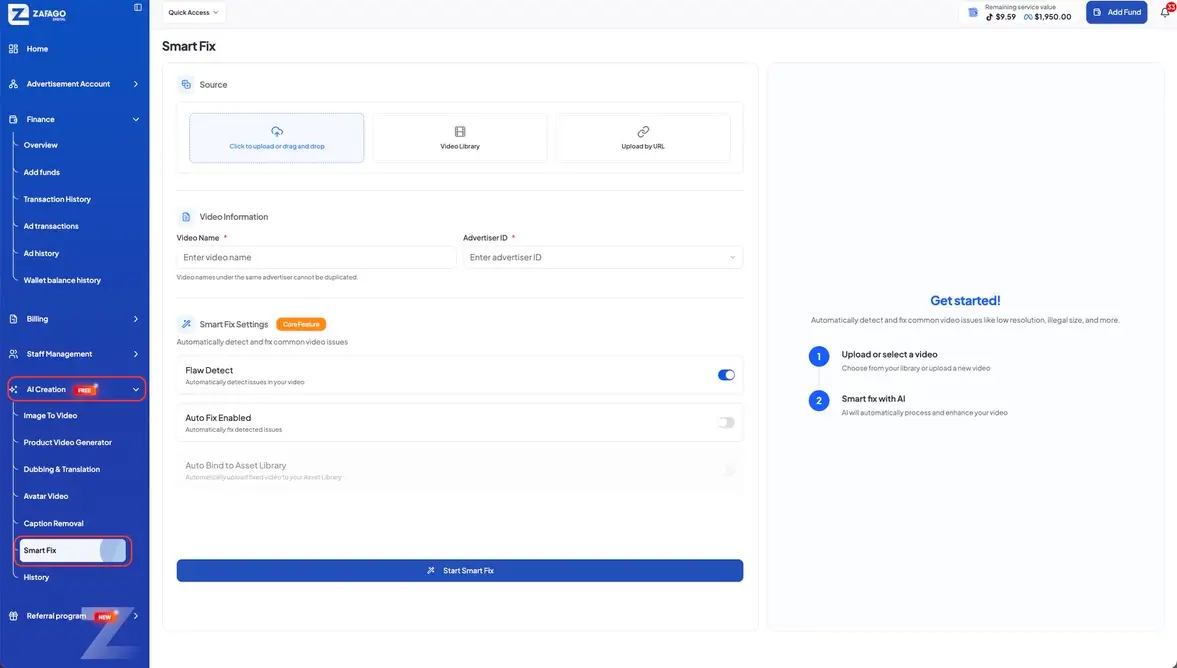
Smart Fix AI supports multiple ways to add a video
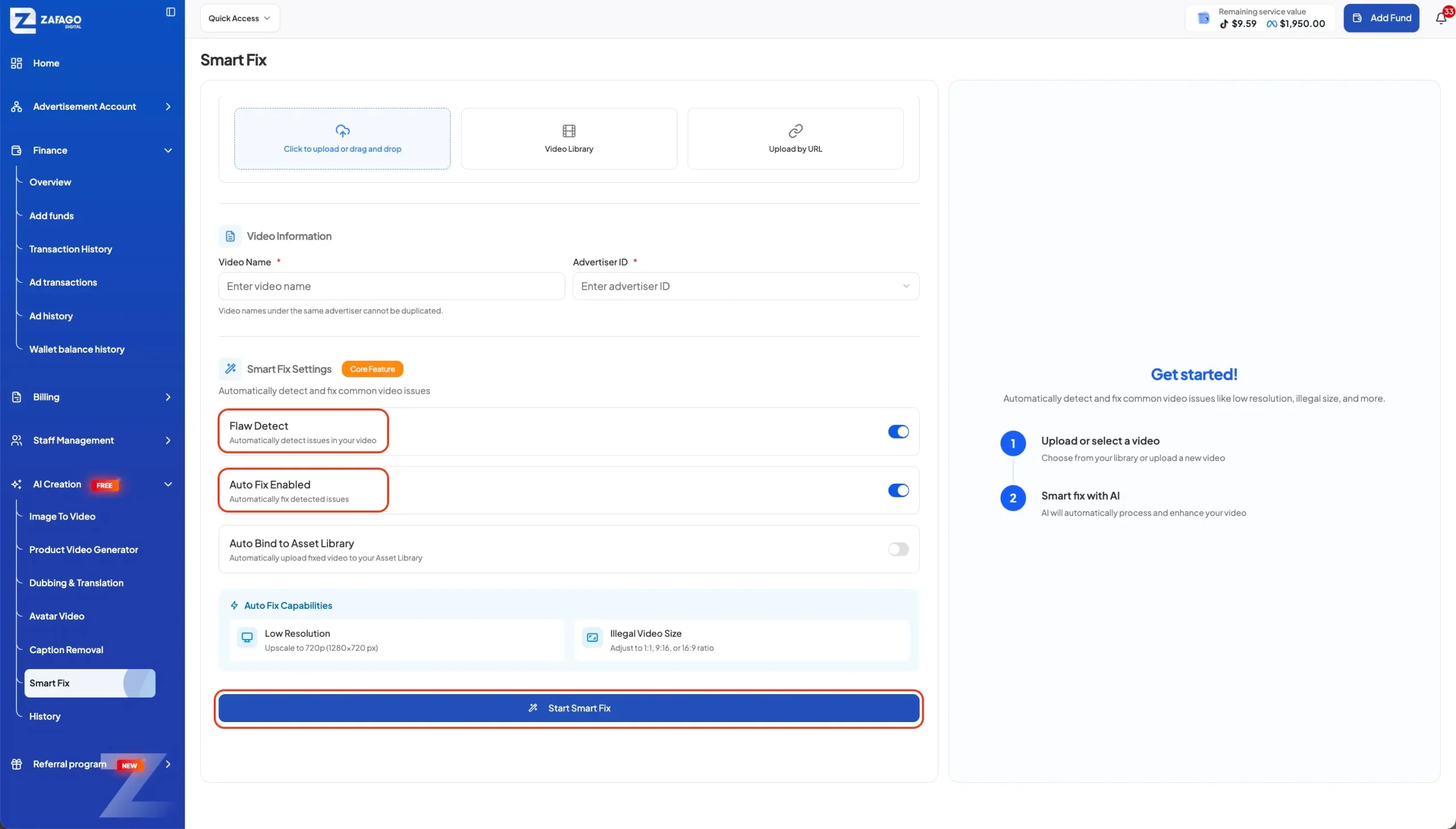
Smart Fix AI allows users to work with videos from different sources, including newly uploaded files, existing assets in Video Library, and videos provided through a URL. This gives teams more flexibility when their creative assets are already stored within the Portal or elsewhere.
To begin, open:
AI Creation → Smart Fix
The Source section provides three options for adding a video.
Upload a new video
Users can select a video directly from their device and bring it into the Smart Fix workflow.
This option works well when a newly produced creative needs to be checked before being used in an advertising campaign.
Select from Video Library
Existing assets can be selected directly from Video Library.
This can save time for teams that already maintain a collection of advertising creatives inside the Portal. There is no need to repeatedly download an existing asset and upload it again simply to perform a technical check.
Upload by URL
Users can also provide a video URL when the relevant asset is available online.
Having these three input methods makes Smart Fix AI more suitable for different creative production workflows rather than limiting users to newly uploaded files.
Smart Fix AI keeps video information organized by advertiser
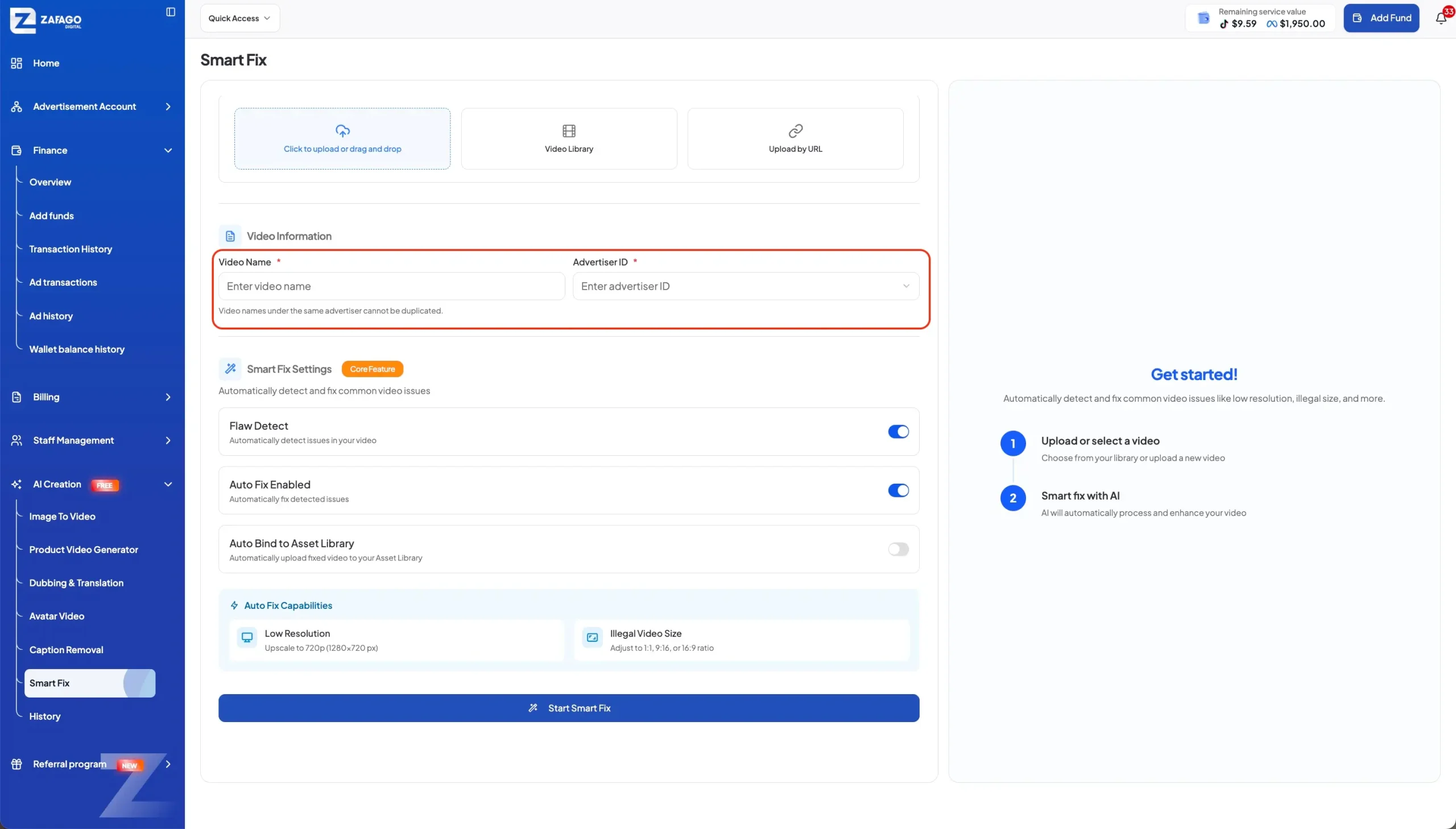
After selecting a video, users can add basic information such as the Video Name and Advertiser ID to associate the asset with the appropriate advertising operation. This organizational step becomes particularly useful when teams handle multiple brands, advertisers, or campaign projects.
The Video Information section allows users to enter the video’s name and select the relevant Advertiser ID.
The interface also indicates that video names under the same advertiser cannot be duplicated.
This requirement can help maintain a cleaner asset structure.
For agencies and marketing teams managing numerous creative files, organization is not a minor detail. Finding the correct version of a video becomes increasingly difficult when assets are created rapidly and naming conventions are inconsistent.
Connecting the video with an advertiser provides additional context when the asset moves through the wider creative and advertising workflow.
Smart Fix AI combines flaw detection with automated fixing
The Smart Fix Settings determine whether the system should identify video problems, automatically fix supported issues, or transfer the processed asset to the Asset Library. Users can enable the relevant options according to how much automation they want in the workflow.
Three settings are particularly important.
Flaw Detect
Flaw Detect is the analysis function that checks the selected video for potential technical issues.
It serves as the first layer of the workflow because users need to understand whether a video requires attention before deciding what to do next.
Auto Fix Enabled
When Auto Fix Enabled is selected, Smart Fix AI can automatically process detected issues when an available fix is supported.
This can reduce the need for manual intervention in routine technical adjustments.
The distinction between detection and fixing is useful because not every workflow needs the same level of automation. Some users may want to inspect detected issues first, while others may prefer to let the system handle supported fixes automatically.
Auto Bind to Asset Library
The workflow also provides an Auto Bind to Asset Library option.
When available, this allows the processed video to be automatically uploaded to the Asset Library, reducing another manual step after processing.
Together, these options create a simple automation flow:
Detect the issue → Fix when available → Store the processed asset
Smart Fix AI simplifies the video preparation workflow
Smart Fix AI is most useful as a technical preparation layer between existing video production and advertising execution. It helps teams check and process assets without requiring every routine technical adjustment to be handled manually.
Consider a typical advertising workflow.
A creative team produces several videos for a campaign. Some assets may have been created by internal designers, while others come from creators or external production partners.
Before those videos are used, the team needs to verify whether the files meet the required technical conditions.
Without an integrated checking process, this can involve:
Download → Open editing software → Inspect → Adjust → Export → Upload again
Smart Fix AI aims to simplify that process.
The video can be brought into the Portal, analyzed, processed when supported, and then continued through the creative workflow.
This is particularly relevant for teams that produce a high volume of short-form advertising content and need to move from creative production to campaign execution quickly.
Smart Fix AI extends Zafago Portal AI Creation beyond content generation
Smart Fix AI complements Zafago Portal’s content creation tools by working with existing videos rather than focusing only on generating new creative assets. This makes it a useful addition for teams that need to prepare, adapt, and manage content throughout the advertising lifecycle.
Within Zafago Portal AI Creation, advertisers can access different creative workflows designed for various production needs.
These can include:
- Image to Video
- Product Video Generator
- Avatar Video
- Dubbing & Translation
- Caption Removal
- Smart Fix AI
The difference is that Smart Fix AI addresses a stage that often happens after content creation.
A business may already have a suitable video but discover that it needs technical adjustments before being used in an advertising workflow. In this situation, creating an entirely new video is unnecessary.
Smart Fix AI provides a workflow specifically for handling this type of requirement.
This makes the Portal more than a place to generate creative content. It can also support the preparation and management of assets that are already part of a business’s creative library.
Smart Fix AI is useful for advertisers managing high creative volume
Teams running frequent advertising campaigns can benefit most from Smart Fix AI because repetitive video checks become more time-consuming as the number of creative assets increases. The feature can help reduce routine technical work while keeping video preparation within the same Portal environment.
For example, an advertising team may work with dozens of creatives across multiple products or advertisers.
Some videos may be new. Others may be older assets being reused in a different campaign. Some may come from a creator, while others may be produced internally.
The challenge is not always creating the content.
It is making sure the existing content can move efficiently through the next stage.
Smart Fix AI can therefore be viewed as part of a broader creative operations process:
Create → Check → Fix → Organize → Advertise
This workflow can be especially useful for teams that prioritize speed but still want a technical checkpoint before launching creative assets.
For advertisers using Rent TikTok Agency Ad Account, Smart Fix AI can also serve as an additional step when preparing video assets for advertising operations.
The two functions serve different purposes. An agency advertising account relates to advertising infrastructure, while Smart Fix AI focuses on video preparation. Used within a broader workflow, they can help separate creative preparation from campaign execution while keeping both processes connected.
Smart Fix AI works best as a pre-advertising quality check
Smart Fix AI should be viewed as a practical quality-control step rather than a replacement for professional video editing. Its value comes from helping users identify common technical problems and automate supported fixes before a video enters an advertising workflow.
A strong creative process still starts with the fundamentals: the right message, audience, product proposition, visual concept, and call to action.
Technical optimization comes afterward.
The advantage of adding an AI-assisted checking stage is that teams can reduce unnecessary manual work without rebuilding content that is already suitable from a creative perspective.
For businesses producing advertising content at scale, even small workflow improvements can become meaningful when repeated across dozens or hundreds of assets.
That is where Smart Fix AI fits into the wider Zafago Portal ecosystem: not as another complicated editing platform, but as a practical tool for making video preparation more streamlined.
Conclusion
Smart Fix AI adds a practical technical-checking stage to the video production workflow, helping advertisers detect and process common issues before their creative assets move into advertising operations.
For teams producing content at scale, the combination of AI video optimization and centralized asset management can reduce repetitive work and create a smoother transition from creative production to campaign execution.
Within Zafago Portal AI Creation, Smart Fix AI works alongside other creative tools while supporting existing video assets. When combined with solutions such as Rent TikTok Agency Ad Account, it can become part of a broader workflow for advertisers managing creative production and TikTok advertising operations.
The real value is simple: teams can spend less time checking routine technical details and more time improving the creative ideas that actually drive campaign performance.
FAQ About Smart Fix AI
What is Smart Fix AI?
Smart Fix AI is an AI-assisted video troubleshooting and processing feature within Zafago Portal. It analyzes selected videos for common technical issues and can automatically process supported fixes.
Where can I access Smart Fix AI?
Users can access the feature through AI Creation → Smart Fix in the Zafago Portal interface.
What video sources does Smart Fix AI support?
Users can add videos by uploading a file from their device, selecting an existing video from Video Library, or providing a video through Upload by URL.
What does Flaw Detect do?
Flaw Detect analyzes the selected video to identify common technical issues. It provides the analysis stage before users decide whether to proceed with available automated fixes.
What is Auto Fix Enabled?
Auto Fix Enabled allows Smart Fix AI to automatically process detected issues when a supported fix is available.
Does Smart Fix AI replace professional video editing software?
No. Smart Fix AI is designed to simplify common technical video checks and supported fixes. It is better understood as a preparation and quality-control tool rather than a complete professional editing solution.
ZAFAGO GLOBAL – Digital Growth Partner
Zafago Global is a Performance Digital Marketing Agency dedicated to partnering with businesses to optimize strategies and drive sustainable revenue growth.