
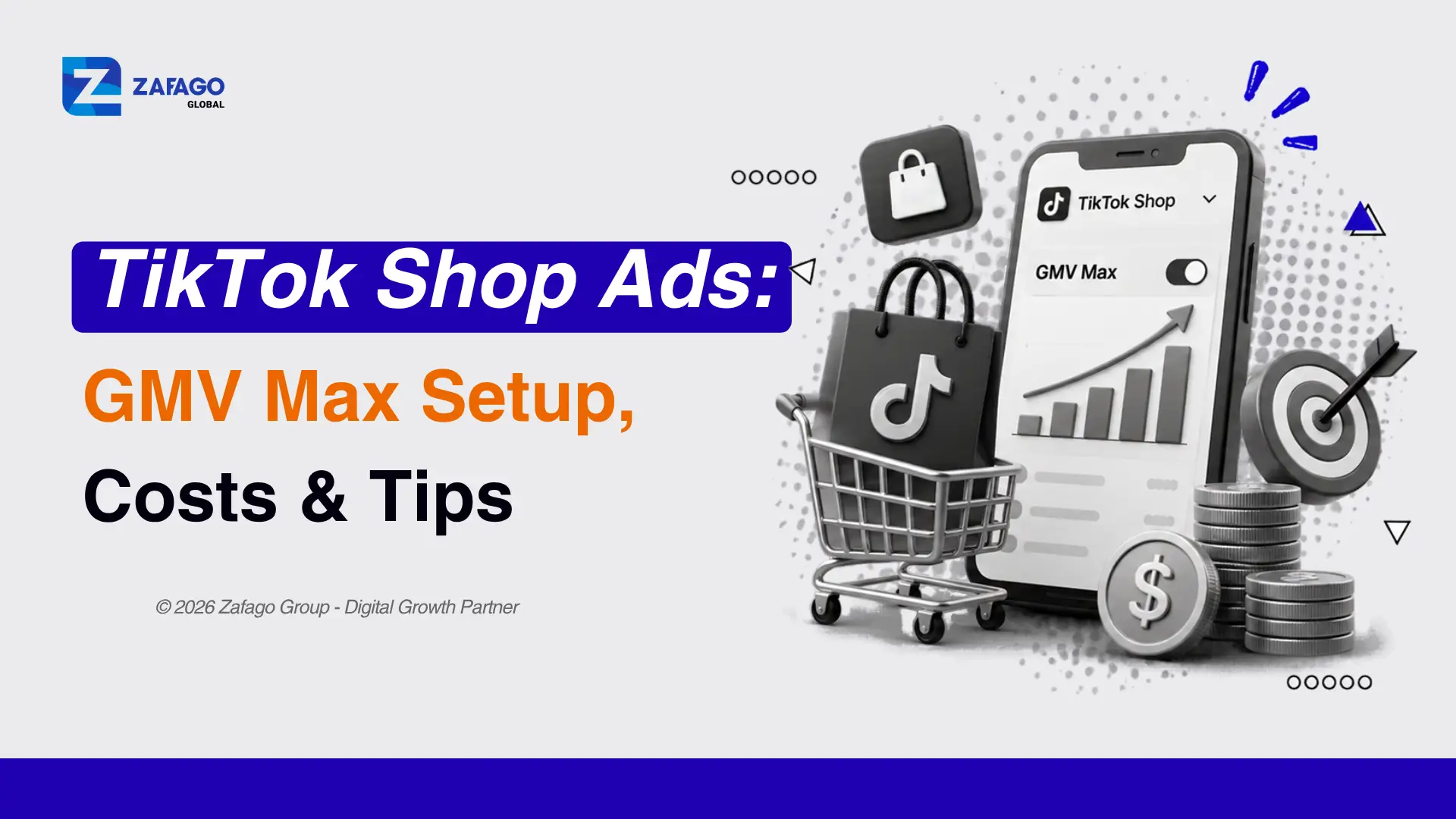
TikTok Shop Ads: GMV Max Setup, Costs & Tips
TikTok Shop Ads help sellers promote products and generate purchases within TikTok Shop. Since July 2025, GMV Max has been TikTok’s default and only supported campaign type for new TikTok Shop Ads campaigns. Eligible sellers can launch Product GMV Max or LIVE GMV Max from Seller Center, set a budget and ROI target, and monitor performance. The key is to connect the right accounts, check product eligibility, and measure profitability—not simply the ROI number shown in the dashboard.
What Are TikTok Shop Ads and How Does GMV Max Work?
TikTok Shop Ads are paid promotions designed to help eligible sellers turn product discovery into purchases inside TikTok Shop. Depending on market availability, ads can reach shoppers across the feed, search, and shopping center placements. Unlike general TikTok Ads campaigns that can promote a website, app, or other destination, Shop Ads use TikTok Shop as the sales destination.
According to TikTok’s Shop Ads migration guidance, GMV Max has been the default and only supported campaign type for new TikTok Shop Ads campaigns since July 2025. Older Shopping Ads formats may still appear in existing campaigns, reports, or specific account workflows, but this guide focuses on the current GMV Max setup for new Shop Ads campaigns.
GMV Max automates key decisions about product promotion, available creative assets, and ad delivery. Sellers typically use one of two campaign types:
| Product GMV Max | LIVE GMV Max | |
|---|---|---|
| Main purpose | Generate sales of selected products or a full-shop product set | Generate sales during a selected livestream |
| Seller Center setup | Promote products | Promote LIVE |
| Main setting | Product selection and ROI target | LIVE account, gross revenue goal, and LIVE ROI target |
| Typical content | Eligible product videos, authorized creator content, and product assets | A live shopping event and its eligible supporting assets |
| Markets listed in TikTok’s setup guide | United States, United Kingdom, Indonesia, Malaysia, Philippines, Thailand, Vietnam, Singapore | Indonesia, Vietnam, Thailand, Philippines, Malaysia, Singapore |
These lists describe availability in the cited Product GMV Max and LIVE GMV Max setup guides; they are not a complete list of countries where TikTok Shop Ads exist. Features, eligibility, and Seller Center navigation may differ by market. Check the latest official guidance before launching in a new country.
What You Need Before Running TikTok Shop Ads
A successful setup starts with the shop and account permissions, not the campaign budget. Check these five requirements first:
- An active, eligible TikTok Shop. Your shop, products, and intended advertising market must meet the platform’s requirements. Products should be approved, available, and accurately described.
- A suitable ad account and Business Center connection. For GMV Max authorization, TikTok requires the GMV Max ad account, TikTok accounts, and TikTok Shop to be associated with the same Business Center.
- The correct permissions. You need the relevant shop promotion and ad-account permissions. If you manage a partner shop, use Seller Center’s Shop Ads > Manage account > GMV Max account flow to request authorization. See TikTok’s GMV Max authorization instructions.
- A realistic budget and ROI goal. Seller Center provides campaign-specific recommended settings, but your product economics determine what you can afford.
- Products and creatives ready to convert. Prepare clear product detail pages, stock availability, benefit-led videos, and authorized affiliate or creator content when applicable.
Important: Renting or using a TikTok agency ad account does not automatically make a shop eligible for GMV Max. Market access, permissions, shop approval, and authorization still apply. Businesses that need help organizing advertiser access and funding can explore Zafago’s TikTok Agency Ad Account service and confirm whether their shop’s GMV Max setup is compatible before moving accounts.
For more preparation details, see Zafago’s guides to TikTok Ads requirements and TikTok Ads Manager accounts.
How to Run TikTok Shop Ads With GMV Max: Step by Step
The walkthrough below follows TikTok’s Product GMV Max Seller Center guide, updated June 2026. Labels and optional modules may vary depending on your market and account.
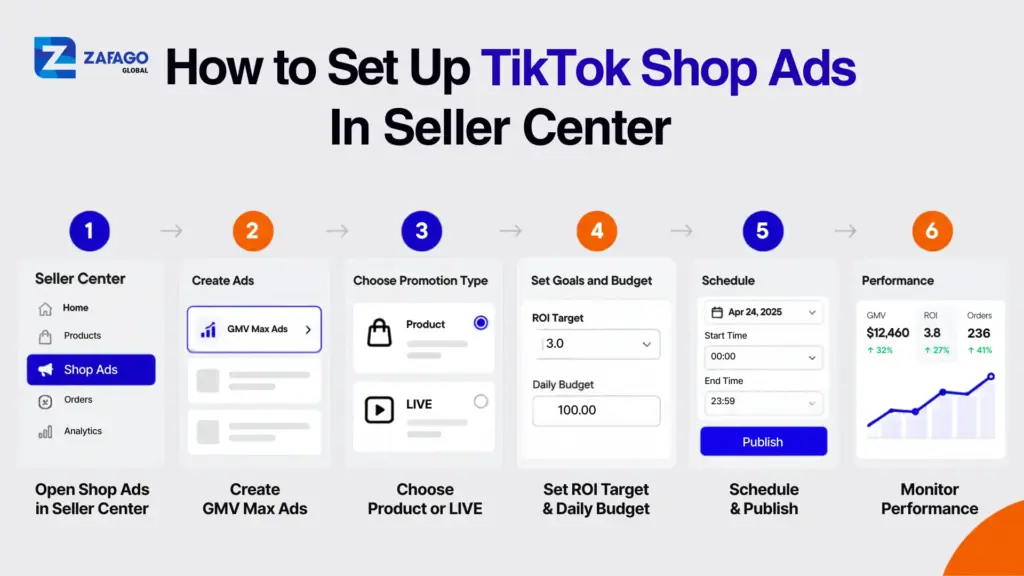
How to set up TikTok Shop Ads in Seller Center
Step 1: Open Shop Ads in Seller Center
Sign in to the relevant TikTok Seller Center and select Shop Ads in the left-hand menu. Confirm that you are working in the intended shop before creating a campaign.
Step 2: Check the GMV Max ad account
Select Create GMV Max ads and verify the ad account shown in the dashboard. TikTok generally limits a shop’s GMV Max access to its designated primary ad account at a time. Changing the primary account can remove access from the previous one and pause existing GMV Max campaigns for that shop. Check the account setup before making the switch, especially if ads are already running. See TikTok’s GMV Max guidelines.
Step 3: Choose Promote products and select eligible products
Select Promote products, then choose either your entire shop catalog or specific products. Review existing campaigns before you proceed:
- If you choose all products, TikTok’s guide instructs you to close active Video Shopping Ads at the ad-group level and conflicting product-specific GMV Max campaigns first. Existing Product Shopping Ads are automatically paused when the full-shop GMV Max campaign starts.
- If you choose specific products, remove overlapping Video Shopping Ads in other ad accounts first. In the same ad account, Video Shopping Ads stop showing the selected products once GMV Max begins; active Product Shopping Ads also stop showing those selected products automatically.
In short, not every overlap requires deleting an entire campaign manually. The correct action depends on the type of older campaign and which ad account contains it.
Step 4: Set an ROI target and daily budget
Review the suggested ROI target and daily budget, then choose settings appropriate for your margins and available spending. An ambitious ROI target can limit delivery if the system cannot find enough eligible sales opportunities at that level. Do not copy targets from a different product category without checking your own data.
Step 5: Choose a schedule
Select when the campaign should begin. The standard Product GMV Max workflow runs continuously after the scheduled start unless you pause or change it. Review any optional promotional or commission-related modules displayed in your account.
Step 6: Review and publish
Confirm the selected products, account, ROI target, budget, and schedule. Then click Publish. Review campaign status and any eligibility messages before assuming that ads are delivering.
Step 7: Monitor performance
Use the reporting overview in Seller Center to review spend, GMV, attributed ROI, product sales, and other available performance indicators. Compare campaign results with actual shop margins and the pre-campaign sales baseline.
Running livestream ads instead? Follow TikTok’s LIVE GMV Max setup guide, updated September 2026. In Seller Center, select Shop Ads > Create GMV Max ads > Promote LIVE; choose the LIVE account, set Gross revenue as the optimization goal, enter a LIVE ROI target and daily budget, choose a schedule, and publish. TikTok requires suitable Admin or Ads Tab permissions, and existing conflicting LIVE shopping or GMV Max campaigns may need to be turned off first.
How Much Do TikTok Shop Ads Cost?
There is no single advertising cost that applies to every TikTok Shop seller. Your daily budget, ROI settings, category competition, product price, creative quality, and conversion performance all influence the economics of a campaign. TikTok’s Seller Center displays applicable settings and recommendations for the account; do not confuse these with a universal cost-per-order benchmark or a guarantee of sales.
A useful starting point is break-even ROI, calculated from your contribution margin before advertising. For a simple illustration, suppose a product generates $25 of contribution profit on every $100 in revenue after product costs, selling fees, expected returns, and other variable costs—but before ad spend. Its contribution margin is 25%, so the simplified break-even revenue-to-ad-spend ratio is 1 ÷ 0.25 = 4.0. Spending $25 to generate $100 of incremental revenue would use up that $25 contribution.
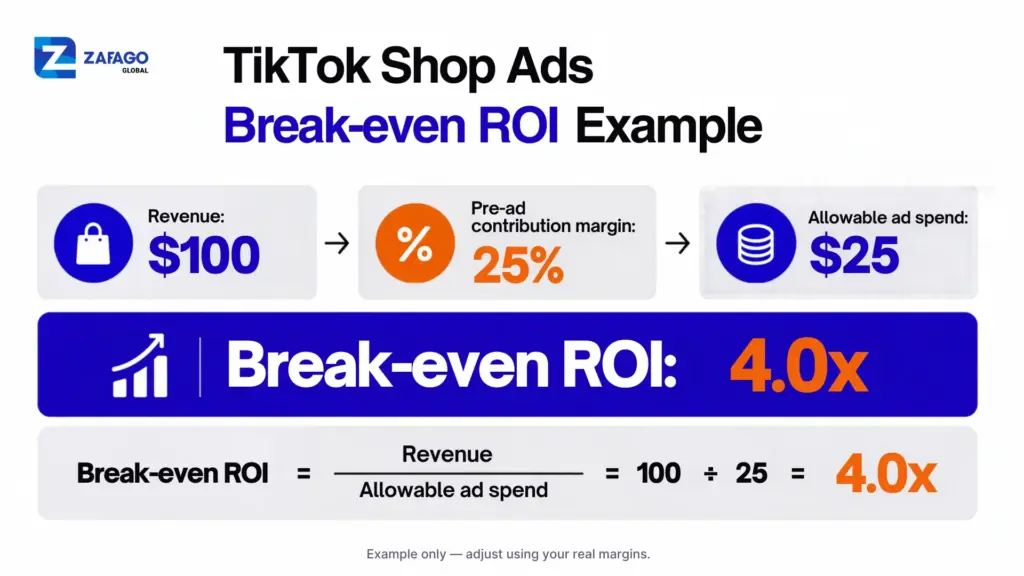
TikTok Shop Ads break-even ROI example with 25 percent margin
| Illustrative scenario | Value |
|---|---|
| Revenue | $100 |
| Contribution margin before ads | 25% |
| Contribution before ads | $25 |
| Maximum ad spend at break-even | $25 |
| Simplified break-even revenue/ad spend | 4.0x |
Measurement caveat: TikTok’s GMV Max reporting can include organic orders, not only orders caused by paid ads. Therefore, a reported GMV Max ROI of 4.0 does not automatically mean you broke even. Compare paid spending with incremental revenue where possible, and account for returns, discounts, commissions, fulfillment, and other real costs.
For a broader explanation of bidding and billing, see Zafago’s guide to TikTok ad prices and budget optimization.
How to Optimize TikTok Shop Ads After Launch
Interpret GMV Max ROI carefully
According to TikTok’s GMV Max attribution guidance, Product GMV Max attributes paid and organic orders for the selected products while the campaign runs, even when a buyer never interacted with an advertisement. LIVE GMV Max similarly attributes eligible orders within the selected LIVE event. Consequently, reported campaign ROI is not the same as incremental return generated by paid media alone. Review before-and-after trends, order volume, contribution profit, and advertising expenditure together.
Improve the product detail page
Check product imagery, descriptions, pricing, shipping expectations, reviews, and inventory. A campaign can attract interested viewers but still struggle to convert if buyers encounter unclear information, low stock, or unexpected costs.
Refresh creative supply
Show the product in the opening seconds, demonstrate a specific benefit, and use variations in hooks, pacing, offers, and creator styles. TikTok’s Product GMV Max creative exploration guidance recommends supplying fresh creatives and resolving authorization or rejection issues that prevent suitable content from entering exploration.
Scale without losing cost control
Review performance over a meaningful period before increasing budget. Change one major variable at a time when practical, and watch whether profitable order volume improves. Features such as automatic budget increases may be available to eligible advertisers, so review your account’s settings rather than assuming spend will always remain at the original daily amount.
Keep your shop and ads policy-compliant
Monitor account warnings, rejected videos, product restrictions, and permissions. Resolve policy or authorization issues before scaling spend, because rejected creatives or account restrictions can reduce the pool of content available for GMV Max delivery.
5 TikTok Shop Ads Mistakes That Waste Budget
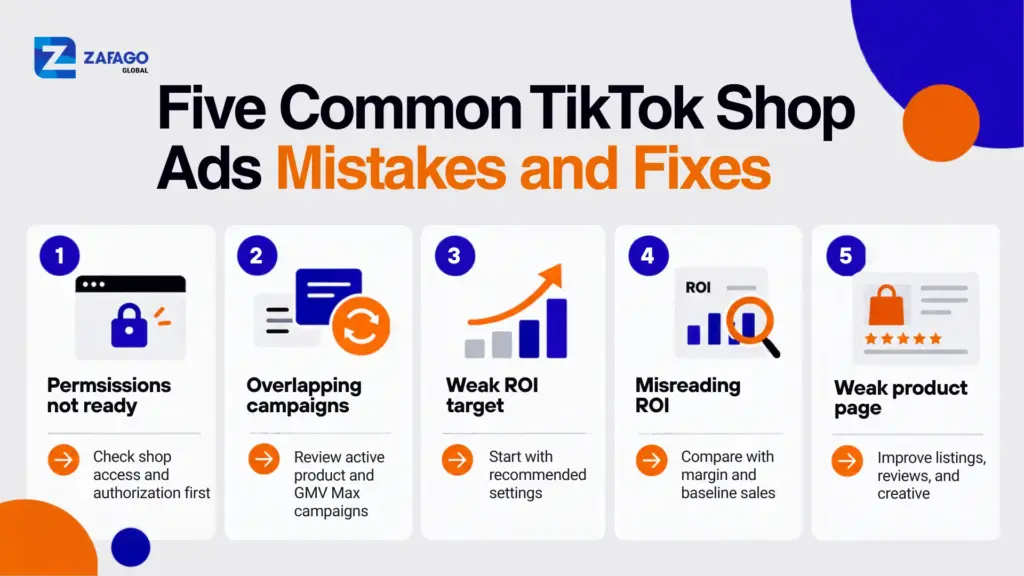
Five common TikTok Shop Ads mistakes and fixes
1. Launching before the shop and account are authorized
A missing account permission or mismatched Business Center connection can stop GMV Max access before any optimization begins. Check your shop permissions and the selected primary ad account in Seller Center first.
2. Misunderstanding overlapping campaigns
Do not assume all legacy Shopping Ads must be manually deleted. Full-shop and selected-product GMV Max have different overlap rules; some Product Shopping Ads pause or stop showing the affected products automatically. Use TikTok’s current Product GMV Max documentation before making changes to existing ads.
3. Setting an unrealistic ROI target or an insufficient budget
A very restrictive target may prevent the system from spending enough to learn. Use relevant Seller Center recommendations as a starting reference, keep your unit economics in mind, and monitor delivery before making large adjustments.
4. Treating attributed ROI as pure ad-driven profit
GMV Max includes eligible organic sales in its attributed reporting. A campaign with a strong dashboard ROI can still generate weak incremental results. Look beyond the campaign headline and calculate contribution after ad spend.
5. Scaling before the listing and creative are ready
If a product page is confusing, the offer is uncompetitive, or the videos fail to show the product quickly, raising the daily budget can amplify waste rather than improve sales. Fix these conversion bottlenecks first.
If the real obstacle is account access, billing coordination, or repeated policy-related issues—not the product or creative—consider discussing TikTok advertising account support with Zafago. Confirm Shop Ads and GMV Max compatibility for your market before changing accounts.
Do You Need a TikTok Agency Ad Account for TikTok Shop Ads?
Not necessarily. Eligible sellers can run TikTok Shop Ads with their own properly authorized advertising account. An agency-supported setup may be useful when a team needs help with account access, funding, billing coordination, or policy-related support, but it does not replace TikTok Shop eligibility or GMV Max authorization.
If you’re comparing different account setups, see our guide to TikTok advertising agencies and rented ad accounts.
| Area | Self-managed advertising account | Zafago-supported agency account |
|---|---|---|
| Account access | Seller creates or manages an eligible account | Agency account access is arranged through Zafago’s process |
| Funding and budgets | Managed through the seller’s own eligible billing setup | Budget funding and allocation supported through the Zafago platform |
| Operational support | Standard account and TikTok support resources | Zafago advertises technical help and guidance for reviews, warnings, and account issues |
| Campaign management | Seller remains responsible for ads, products, and performance | Advertiser still needs compliant campaigns and suitable shop permissions |
| GMV Max access | Requires eligible shop and relevant authorization | Not automatically included; must be confirmed for the shop and market |
| Fees | Normal platform and payment terms apply | Zafago advertises free account creation; confirm any further service, transaction, or payment charges |
Before requesting an account, ask these practical questions:
- Is my market and TikTok Shop eligible for Product or LIVE GMV Max?
- Can the proposed account be authorized as the shop’s primary GMV Max ad account? TikTok generally permits one primary GMV Max account per shop at a time. Changing the primary account may pause ongoing GMV Max campaigns.
- How will creative approvals and policy checks work for automated GMV Max creatives and authorized creator content?
- What are the funding, access, currency, billing, service fee, and account-change terms for my business?
- Does the provider support my product category and destination market under TikTok’s rules?
For businesses evaluating a provider, explore Zafago’s TikTok Agency Ad Account service to review its public benefits and contact the team about your exact shop setup. For a broader comparison of management structures, see TikTok Agency Ad Account benefits, setup, and best practices.
Conclusion
TikTok Shop Ads can connect product discovery with purchases, but strong performance requires more than setting a daily budget. Start with an eligible shop, the correct GMV Max permissions, a competitive product offer, and creatives that communicate value quickly. After launch, evaluate ROI alongside contribution margin, organic attribution, and actual order growth rather than relying on the dashboard number alone. Scale spending only when the underlying business economics support it.
FAQ
Can I run TikTok Shop Ads without an agency account?
Yes. If your shop, market, and advertising setup are eligible and correctly authorized, you can use your own ad account. Agency support is optional.
Do TikTok Shop Ads require GMV Max in 2026?
For new TikTok Shop Ads campaigns, TikTok states that GMV Max has been the default and only supported campaign type since July 2025. Eligibility still varies by market and campaign type.
How much should I budget for TikTok Shop Ads?
Start with your contribution margin, the recommendations and minimums displayed in your eligible account, and a budget you can evaluate over a meaningful period. There is no single appropriate budget for every seller. Judge results against your real profit, not dashboard ROI alone.
Why are my TikTok Shop Ads not spending?
Check shop and account authorization, product eligibility, campaign status, any overlapping campaigns, your ROI target, available budget, and creative restrictions. Address account-level issues before changing bids or budgets repeatedly.
How can I improve TikTok Shop Ads ROI?
Improve product margins and listings, offer more eligible video variations, monitor delivery, and make measured budget adjustments. When evaluating ROI, remember that GMV Max reporting can include organic orders.
ZAFAGO Global – Digital Growth Partner
Zafago Global is a Performance Digital Marketing Agency dedicated to partnering with businesses to optimize strategies and drive sustainable revenue growth.
 Office: 21st Floor CMA Building 64 Connaught Road Central, Hong Kong 999077
 Hotline :(+84) 888-025-050
 Email: biz@zafagodigital.com