

Set Up TikTok Business Manager and Control Who Has Access
TikTok Business Manager is the common name for TikTok Business Center, the official TikTok for Business tool for managing ad accounts, team members, partners, and marketing assets in one place. To use it, sign in at business.tiktok.com, create a Business Center, then add ad accounts and assign roles to people instead of sharing passwords. This guide covers login, setup, permissions, and agency access.
What Is the Difference Between TikTok Business Manager and Ads Manager?
“TikTok Business Manager” is how many advertisers search for TikTok Business Center. TikTok’s own documentation uses the name Business Center, so this guide uses both terms: Business Manager for the search phrase, Business Center for the actual platform features.
The simplest way to separate the two tools is to think about account management versus campaign execution. TikTok Business Center helps businesses organize owned or shared ad accounts, marketing assets, and user permissions in one place. TikTok Ads Manager is where campaigns are created, launched, monitored, and optimized. With the right Business Center permissions, you can grant or remove access for team members and agency partners without sharing login credentials.
Both tools sit under one TikTok for Business account, which acts as the master login for Business Center and Ads Manager.
| Platform | Main purpose | Typical users |
| TikTok Business Center | Manage ad accounts, assets, members, and partners | Business owners, agencies |
| TikTok Ads Manager | Create, launch, and optimize ad campaigns | Advertisers, media buyers |
| TikTok Business Account | Run a brand’s profile and content on TikTok | Brands, content teams |
| TikTok Shop Seller Center | Manage shop products and orders | TikTok Shop sellers |
If you want to go deeper on campaign setup after your Business Center is ready, read our guide to TikTok Ads Manager.
How to Log In to TikTok Business Manager
The official login page is business.tiktok.com. Logging in takes four steps:
- Open the TikTok Business Center website and click Log in in the top right corner.
- Enter your TikTok for Business login credentials, or select Log in with TikTok if you have linked your TikTok account to TikTok for Business.
- Complete 2-step verification if you have turned it on.
- If you belong to more than one Business Center, pick the one you want on the Select an account page.
A personal TikTok account and a TikTok for Business account serve different purposes, but they can be linked for easier access. Depending on your account setup, you may sign in using your TikTok for Business credentials or the Log in with TikTok option. If you do not have a TikTok for Business account yet, follow the available sign-up process before creating your Business Center.
How to Create a TikTok Business Manager Account
You need a TikTok for Business account before you can create a Business Center. New users get one automatically during the steps below, and existing users simply log in first.
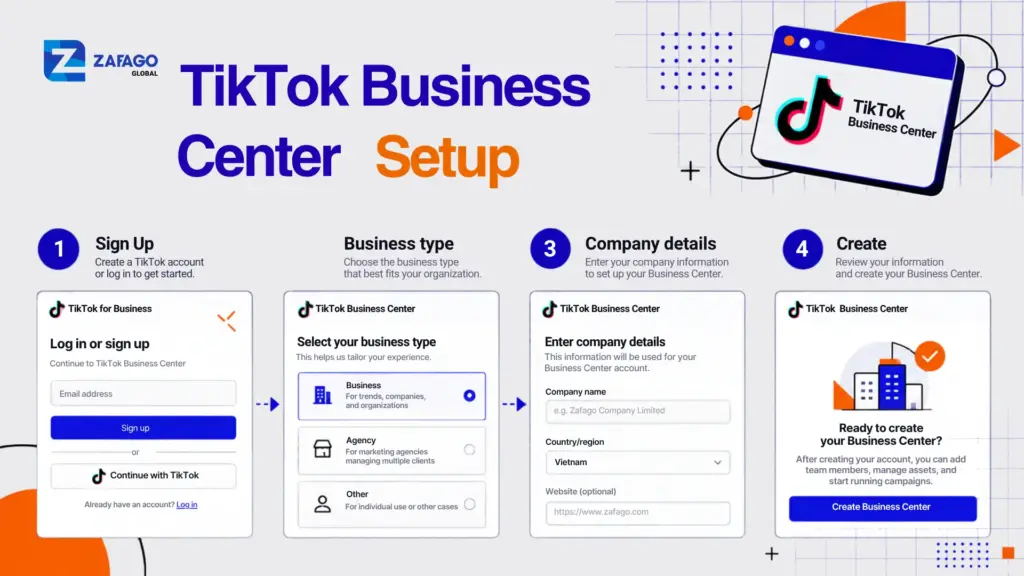
How to create a TikTok Business Center account
- Go to business.tiktok.com and click Sign up. If you already have a TikTok for Business account, click Log in instead.
- New users enter an email and password, accept the terms, and type the verification code sent to their email.
- Choose the business type that fits you: I am an advertiser or I am an agency.
- Select your country or region and enter the full legal name of your company.
- Make sure your company name and Business Center name are consistent, then check that the time zone and currency match how you operate.
- Click Create (some flows show Confirm) to finish.
- When prompted, click Turn on for 2-step verification. It is optional, but it protects the one account that controls all your ad assets.
Review every field before you submit. TikTok warns that business information may not be editable after the Business Center is created. Advertisers can also create their first ad account during this step, which saves a trip back later.
A few details are worth knowing. One TikTok for Business user can create up to 30 Business Centers, which helps if you need to separate brands, regions, or business units. To add another, use Create new on the Select an account page. TikTok recommends creating additional Business Centers under an existing Company profile so your ad accounts stay consolidated. If you work with a TikTok sales representative, they may send you a special registration link that streamlines the same process.
For the official walkthrough, see TikTok’s guide on how to set up a Business Center.
How to Add and Organize Ad Accounts in TikTok Business Center
Only Business Center Admins can create ad accounts. If you are an advertiser promoting your own business, the process looks like this:
- In Business Center, click Accounts in the left-side menu.
- Under the All accounts tab, open Advertiser accounts.
- Click Add advertiser account, select Create New, and click Next.
- Enter the account name, time zone, and contact information.
- Click Confirm.
Admins can also request access to an existing ad account from the same area instead of creating a new one. Agencies follow a similar path, but they also provide the client’s company details and billing information.
Separate ad accounts let you keep budgets, campaigns, and performance data apart for each brand, product line, or region. A practical structure is one ad account per brand or market, with members assigned only to the accounts they actually work on.
Once your ad accounts and team permissions are organized, the next step is building an effective advertising workflow. Our guide to TikTok Ads services for sustainable business growth explains how campaign planning, performance tracking, and ongoing optimization work together to support long-term business growth.
Some limits apply. The number of ad accounts you can create varies by Business Center type, self-serve creation is only available in certain countries and regions, and ad accounts cannot be created in Creator Agency Business Centers. If you hit a limit, TikTok directs you to your account manager or customer support.
For campaign-level setup inside the new account, use our TikTok Ads Manager account setup guide. You can also read TikTok’s official article on creating ad accounts in Business Center.
How to Add Team Members and Set Roles
Adding people by email is safer than sharing one login across the team. Admins can do it in a few steps:
- Click Users in the left-hand menu and select Add Members.
- Enter the member’s email address and confirm the name.
- Choose a role: Admin or Standard. You can optionally add a finance role on top.
- Click Next and, if needed, choose the accounts and assets the member can access and the access level for each.
- Click Save. The invitation goes to the email you entered.
If the invite does not arrive, open the member’s email in the Users tab and click Resend request. One Business Center can hold up to 4,000 members.
The four roles work like this:
| Role | What it can do |
| Admin | Full access to Business Center functions, including adding members, inviting partners, and creating ad accounts |
| Standard | Works only on the accounts and assets assigned to them |
| Finance Manager | Manages payment methods, balances, billing groups, and invoices |
| Finance Analyst | Views and downloads financial data only |
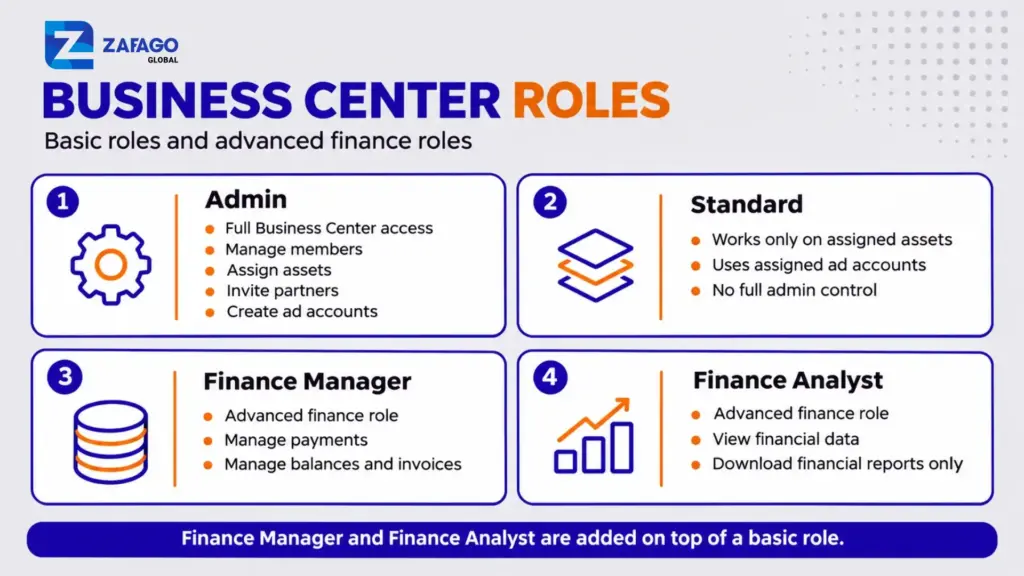
TikTok Business Center roles and permissions explained
Finance Manager and Finance Analyst are advanced roles layered on top of a basic role, and Admins need one of them to view or manage finances. Ad account roles inside Ads Manager are set separately from Business Center roles.
For TikTok accounts, you can also control publishing. The Only show as ads permission stops a member from posting to the profile, while Show on TikTok profile and as ads allows it.
Good access habits keep the setup safe:
- Give people the lowest role that lets them do their job.
- Assign finance roles only to those who handle payments or invoices.
- Review members and partners on a regular schedule.
- Remove access as soon as an employee or vendor leaves.
TikTok explains each permission in detail in its article on Business Center roles and permissions.
How to Share Access With an Agency Partner
If an agency or freelancer runs ads for you, add them as a partner so they work inside your assets without owning them. You need Admin access, plus your partner’s Business Center account ID or ad account ID.
- Log in to Business Center and click Partners in the left-hand menu.
- Click Add partner.
- Enter the partner’s Business Center account ID, or their ad account ID if you prefer that route.
- Click Next, then select the accounts and assets you want this partner to access and set the permission level for each.
- Click Next and Confirm.
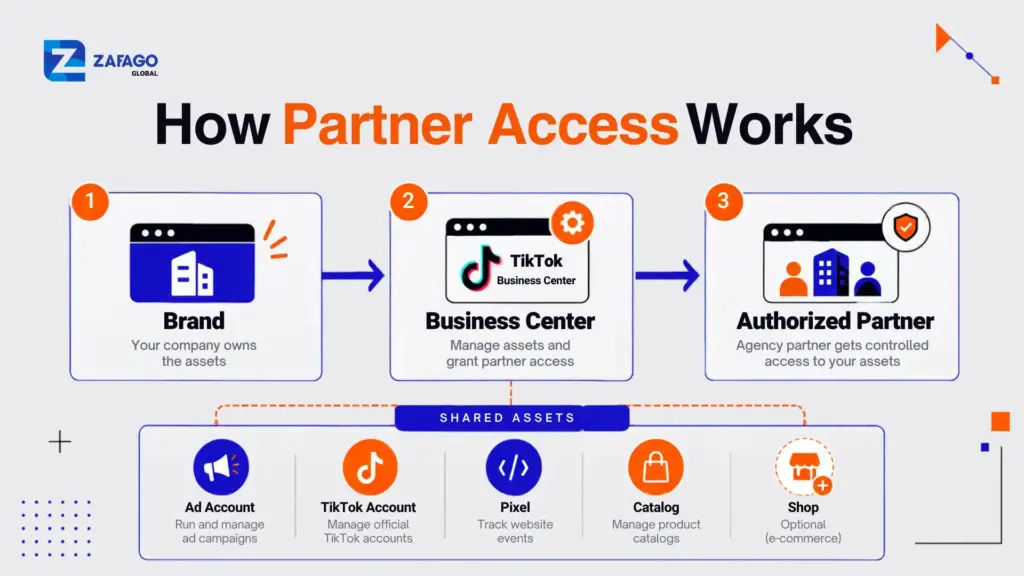
How to add an agency partner to TikTok Business Center
Once the partner accepts the invitation, the shared assets appear in their Business Center. Assets you can share include ad accounts, TikTok accounts, Pixels, Catalogs, and, in selected countries, TikTok Shops. Sharing access is a different action from transferring an account, which is a separate Admin function.
Before adding anyone, confirm who owns each account, who holds Admin rights, and exactly which assets the partner needs. If you would rather use an advertising account provided by an agency than connect your own, see Zafago’s TikTok Agency Ad Account service.
TikTok’s own steps are in its article on adding partners to your Business Center.
Common TikTok Business Manager Access Problems
You cannot get into Business Center. Check that you are signing in with the correct TikTok for Business account or a TikTok account linked to it. If you manage multiple Business Centers, make sure you select the correct one after logging in. You should also verify that any pending invitation has been accepted and that your account has the required permissions.
You cannot add an ad account. Creating ad accounts requires Admin access. Also check whether your country is eligible for self-serve creation, whether you have reached your account limit, and whether your Business Center type allows it.
A team member never got the invitation. Confirm the email address, ask them to check spam, and use Resend request from the Users tab.
You cannot share assets with a partner. Only Admins can invite partners and share assets. Double-check the partner’s ID and that you selected the assets during the invitation.
You cannot see billing or finance settings. Admin alone is not enough. A Finance Manager or Finance Analyst role has to be added on top of it.
If your issue involves ad rejections or account restrictions rather than access, check TikTok advertising requirements and use TikTok’s official review and support channels. Account decisions are made by TikTok, so no third party can guarantee a particular outcome.
When Is a TikTok Agency Ad Account Worth Considering?
You do not need an agency ad account to use Business Center. Creating a Business Center, adding your own ad account, and managing your team all work on their own.
An agency-provided account becomes worth a look in specific situations: you want to advertise to several markets, you prefer a prepaid USD account with simplified funding, or you want hands-on help with account operations instead of handling every issue alone.
Zafago is an official Top Mega TikTok Partner in Vietnam, offering TikTok Agency Ad Account solutions for businesses seeking international advertising access and professional account support.
Through Zafago’s agency account service, advertisers can request an advertising account, fund their Zafago balance, and allocate advertising budgets to the account. The service also provides guidance on campaign setup, advertising policies, account-related issues, and performance optimization.
According to Zafago’s published service information, account creation is offered without an account-opening fee. However, supported payment methods, transaction costs, funding timelines, and account-specific conditions should be confirmed directly with Zafago before proceeding.
Account availability, supported markets, funding requirements, and ongoing support conditions may vary depending on the account type. Before requesting an agency account, businesses should confirm account ownership, access permissions, payment conditions, and service terms. All campaigns must comply with TikTok’s advertising policies, and approval decisions remain under TikTok’s control.
If you want to compare account options, requirements, and support terms, explore Zafago’s TikTok Agency Ad Account service.
FAQ
Is TikTok Business Manager free to use?
In TikTok’s standard setup steps, creating a Business Center does not involve a purchase. Your costs come from ad spend and from any third-party services you choose to use, so check TikTok’s current terms before you commit budget.
Can I manage multiple ad accounts in one Business Center?
Yes. Business Center is designed to hold multiple ad accounts so you can separate brands, products, or regions. The number of ad accounts allowed depends on your Business Center type, and one user can create up to 30 Business Centers.
Can I add an agency to my Business Center?
Yes. An Admin opens Partners, clicks Add partner, enters the agency’s Business Center ID or ad account ID, and chooses which assets and permissions to share. The agency sees the shared assets after accepting the invitation.
Do I need a TikTok Agency Ad Account to use Business Center?
No. Business Center works without one. An agency ad account is an optional way to get an account with agency-level support and funding, and you can review the available options on Zafago’s TikTok Agency Ad Account page.
Why can’t I see billing settings in Business Center?
Access to billing and financial information depends on your assigned Business Center permissions. Finance Analysts can view and download financial data, while Finance Managers can manage payments, balances, and invoices. Even Business Center Admins need the appropriate advanced finance role to access these features.
ZAFAGO Global – Digital Growth Partner
Zafago Global is a Performance Digital Marketing Agency dedicated to partnering with businesses to optimize strategies and drive sustainable revenue growth.
 Office: 21st Floor CMA Building 64 Connaught Road Central, Hong Kong 999077
 Hotline :(+84) 888-025-050
 Email: biz@zafagodigital.com