
Zafago Portal Smart Fix Helps Detect and Fix Video Issues with AI
Preparing a video for advertising often requires more than having the right message or creative concept. Technical issues such as unsuitable resolution, incorrect dimensions, or other video problems can create additional work before an asset is ready for use.
Zafago Portal Smart Fix provides an AI-assisted workflow for detecting and fixing common video issues directly within the Portal. Users can upload an existing video, select content from the Video Library, or provide a video URL before letting Smart Fix analyze the asset.
As part of Zafago Portal AI Creation, the feature helps advertisers add a technical video-checking step to the same environment used for creative production and advertising operations.
Zafago Portal Smart Fix detects common video issues with AI
Zafago Portal Smart Fix automatically analyzes uploaded videos to identify common issues such as low resolution, unsuitable video dimensions, and other technical problems. Users can enable Flaw Detect to analyze the asset and use Auto Fix when available to automatically process detected issues before continuing with the video.
The workflow is designed to remain simple even for users without professional video editing experience.
Instead of manually inspecting every technical detail, Smart Fix provides an additional automated check before a creative is used in an advertising workflow.
Step 1: Upload or select the video source
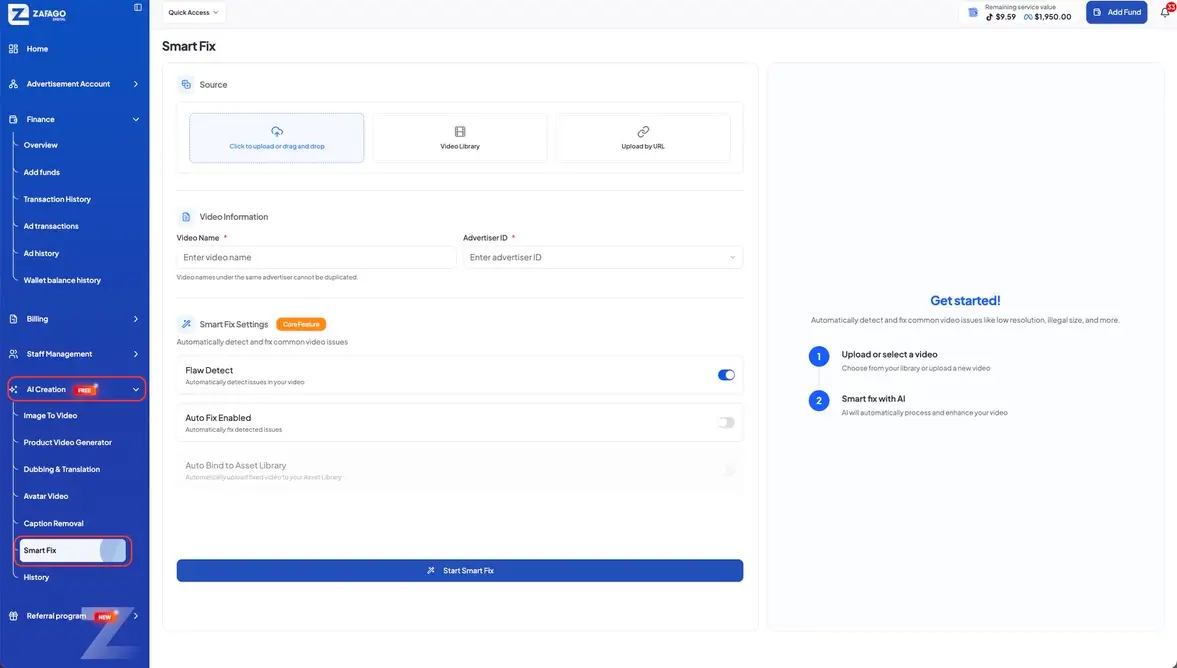
Open AI Creation > Smart Fix from the Zafago Portal sidebar.
The Source section provides three ways to add a video:
- Upload a new video from your device.
- Select an existing asset from Video Library.
- Add a video through Upload by URL.
Having multiple input options is useful when teams manage a growing creative library. Existing content does not always need to be downloaded and uploaded again before processing.
Step 2: Add the video information
After selecting the source, complete the Video Information section.
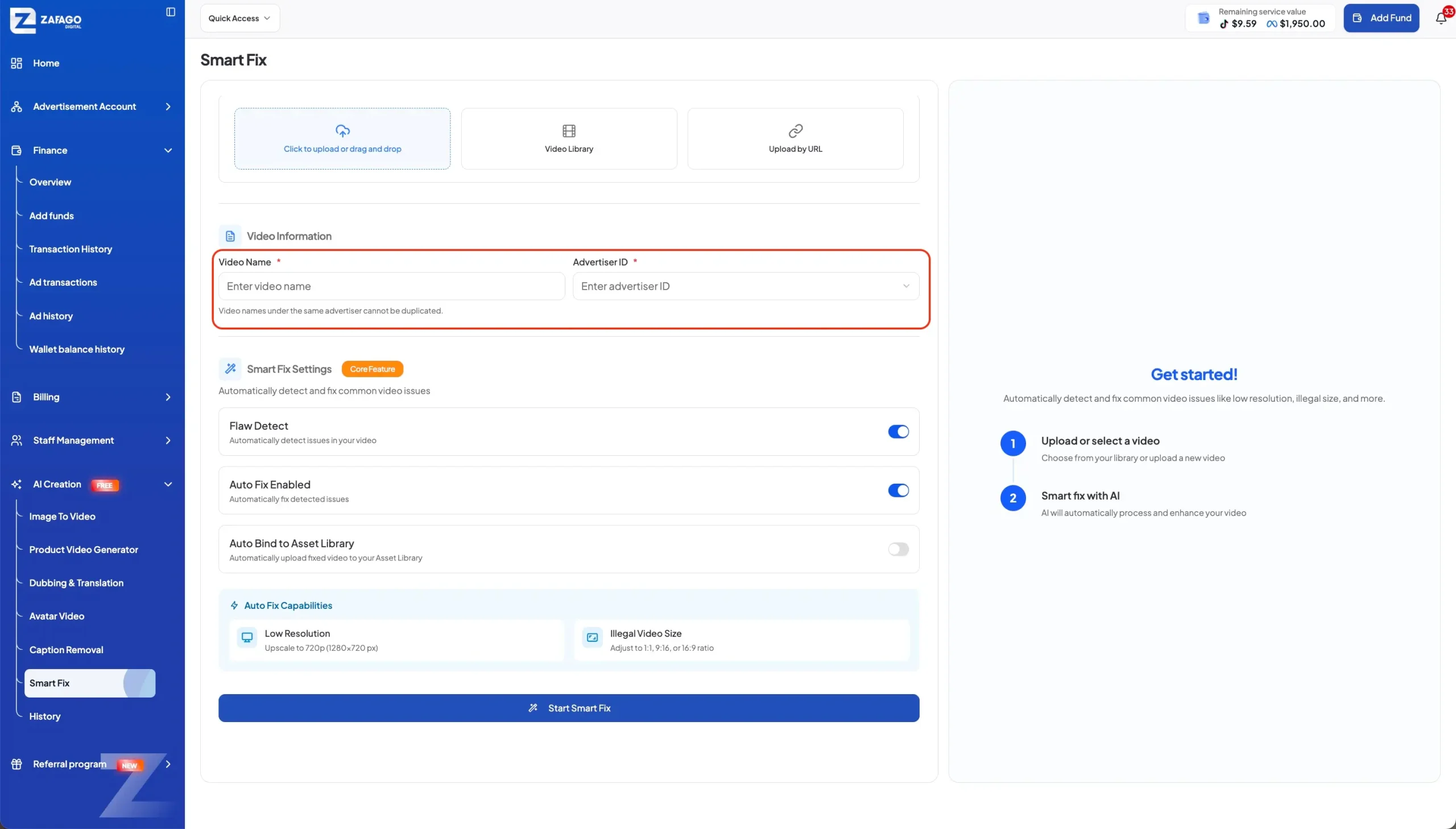
Enter a Video Name and select the corresponding Advertiser ID. The interface also indicates that video names under the same advertiser cannot be duplicated.
Connecting the asset with an advertiser helps keep videos more organized when a team works with multiple advertising accounts or produces content for several brands or markets.
Step 3: Configure the Smart Fix settings
The Smart Fix Settings section controls how AI analyzes and processes the video.
Flaw Detect automatically detects issues in the selected video. This is the core analysis function and can be enabled before processing begins.
The interface also provides Auto Fix Enabled, which is designed to automatically fix detected issues when available.
An Auto Bind to Asset Library option is also shown in the workflow for automatically uploading the processed video to the Asset Library when the feature is available.
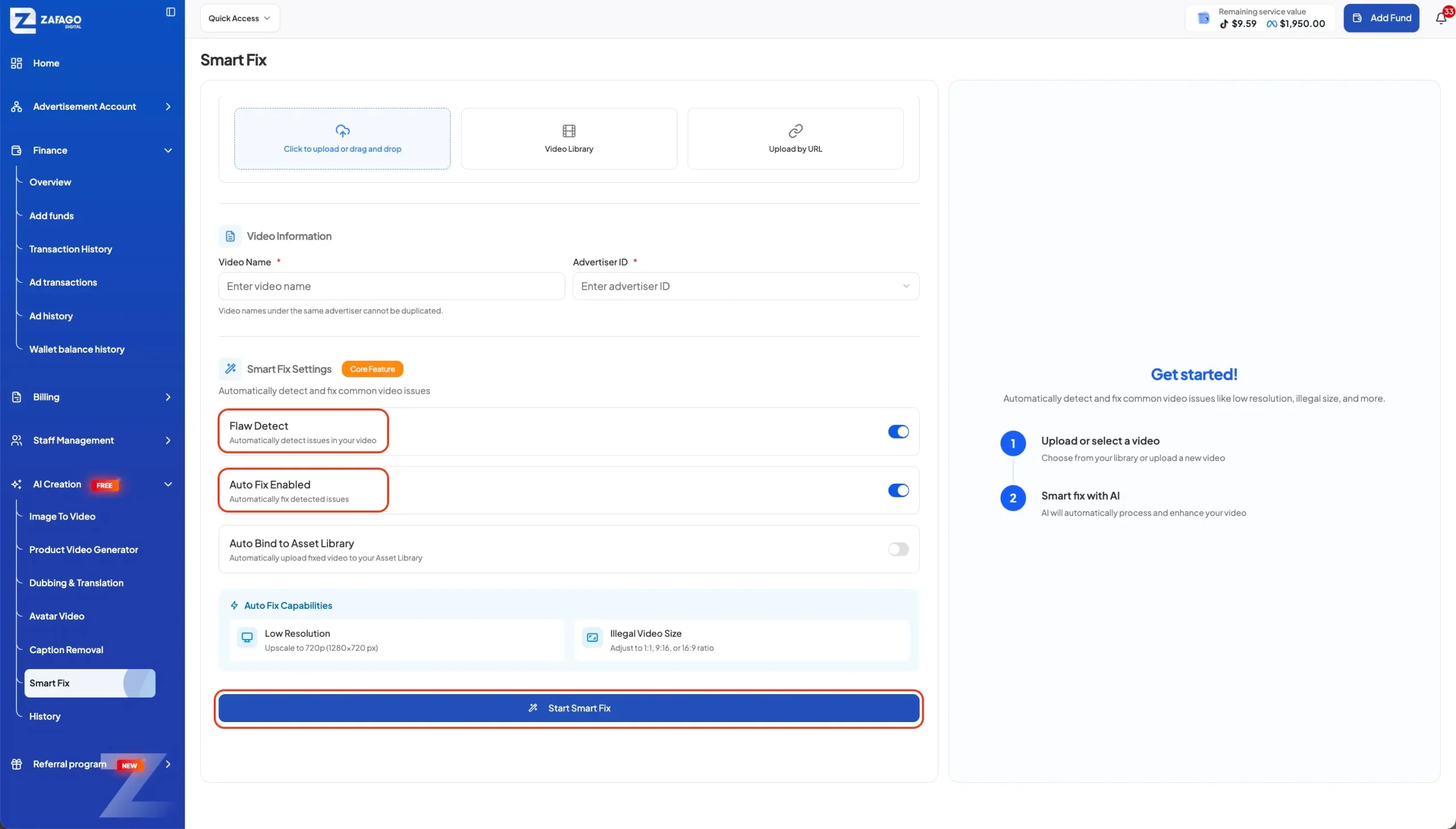
This structure gives users more control over whether they only want to detect problems or continue with automated processing.
Step 4: Start Smart Fix and process the video
Once the source, video information, and settings are ready, click Start Smart Fix.
The AI will process the selected video based on the enabled settings. Users can then continue working with their creative instead of manually checking every potential technical issue from the beginning.
Zafago Portal Smart Fix adds video optimization to AI Creation
Smart Fix extends Zafago Portal beyond AI video generation by helping users work with existing creative assets. While tools such as Image to Video, Product Video Generator, and Avatar Video focus on creating content, Smart Fix provides an additional workflow for detecting and processing technical issues in videos that teams already have.
This is useful for advertisers producing and testing creative frequently. A team may receive videos from creators, reuse previous assets, adapt content for another market, or manage videos from several campaigns.
Within the same Zafago Portal AI Creation environment, users can also access Dubbing & Translation, Caption Removal, Avatar Video, Image to Video, and other creative workflows.
For advertisers using Rent TikTok Agency Ad Account, Smart Fix adds another practical step between preparing creative assets and using them in advertising operations.
Rather than functioning as a complete professional video editor, Zafago Portal Smart Fix focuses on a more specific task: helping users detect common video problems and simplify the process of preparing existing assets with AI.
FAQ
What is Zafago Portal Smart Fix?
Zafago Portal Smart Fix is an AI-assisted feature that analyzes existing videos to identify common technical issues and automatically process supported fixes before the assets are used for advertising.
How can I add a video to Smart Fix?
Users can add a video in three ways: upload a new file from their device, select an existing asset from the Video Library, or provide a video URL through the Upload by URL option.
What does Flaw Detect do in Smart Fix?
Flaw Detect analyzes the selected video to identify common technical issues, such as unsuitable resolution or video dimensions. It helps users check the asset before proceeding with available fixes.
Can Smart Fix automatically fix video problems?
Yes. When Auto Fix Enabled is turned on, Smart Fix can automatically process detected issues when a supported fix is available. Users can choose whether to use automated fixing after enabling the detection function.
Can processed videos be saved to the Asset Library?
Yes. When the Auto Bind to Asset Library option is available and enabled, the processed video can be automatically uploaded to the Asset Library, making it easier to continue managing the asset within Zafago Portal.
ZAFAGO GLOBAL – Digital Growth Partner
Zafago Global is a Performance Digital Marketing Agency dedicated to partnering with businesses to optimize strategies and drive sustainable revenue growth.