
How to Create a Product Video AI with Zafago Portal 2026
Create a Product Video AI with Zafago Portal
Creating a product video does not always require a full production workflow. With Product Video AI in Zafago Portal, users can turn existing product images, videos, descriptions, and selling points into a ready-to-use video through a guided AI workflow.
The Product Video Generator is part of the AI Creation suite inside Zafago Portal. Instead of moving between separate tools for visuals, copy, voice, and subtitles, users can prepare the core product information and generate video content from the same advertising ecosystem.
This is particularly useful for ecommerce brands and advertisers that regularly need new creative variations for products, campaigns, or different markets.
This guide explains how to create a Product Video AI in Zafago Portal and how each setting contributes to the final result.
Product Video AI turns existing product assets into video content
Product Video AI uses product images or videos together with product information to generate a complete marketing video. Users provide the source assets, product name, description, selling points, language, and other preferences, while Zafago Portal handles the AI-assisted video creation process within a single workflow.
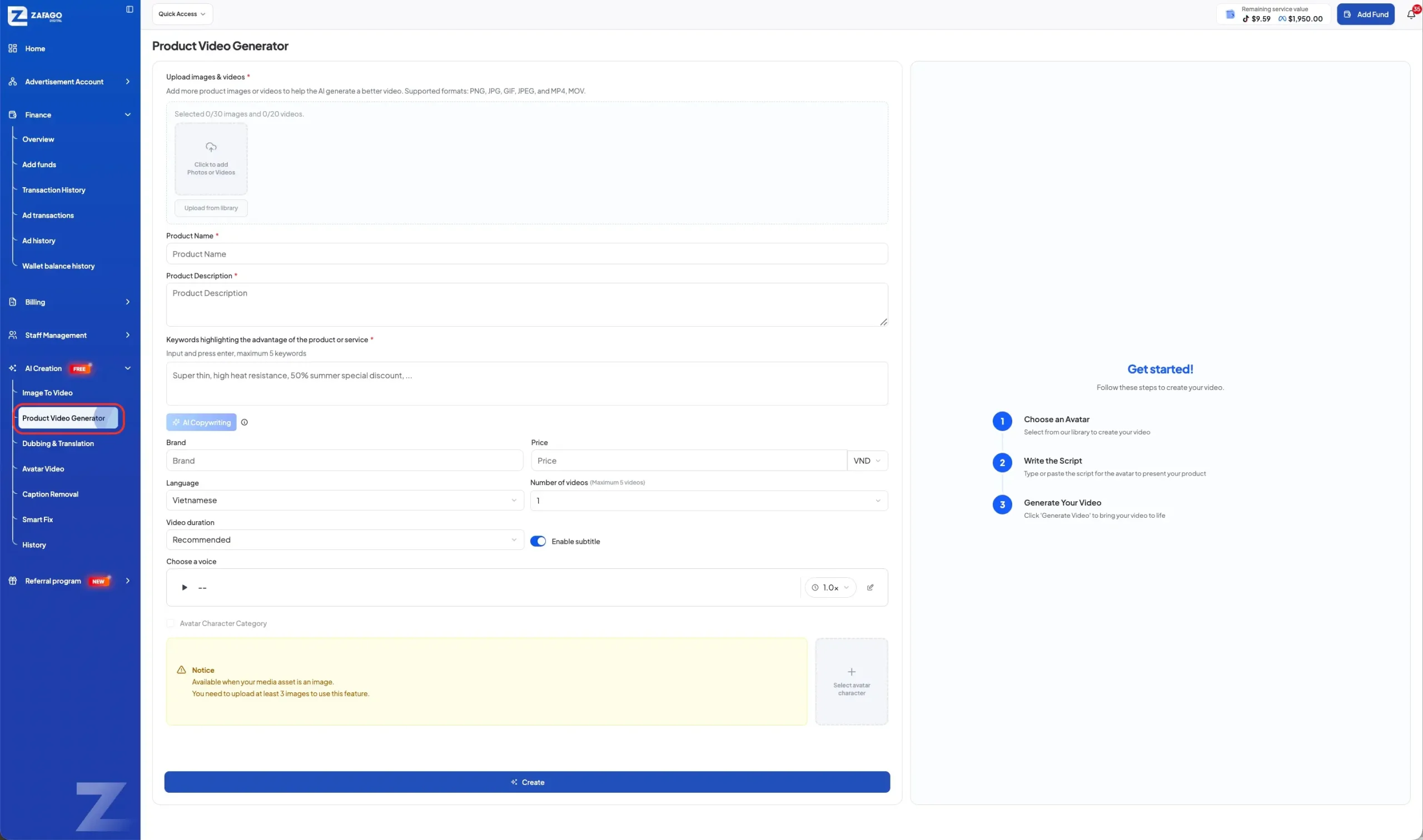
The feature is available under AI Creation → Product Video Generator in Zafago Portal.
Before starting, prepare the product information you want the AI to work with. This usually includes:
- Clear product images or existing video clips
- Product name
- Short product description
- Important benefits or selling points
- Brand information when applicable
- Product price when relevant
The quality of these inputs matters. AI can organize and transform the information provided, but clear source material gives the system a better foundation for creating a useful product video.
For example, instead of entering only “comfortable shirt,” a more specific input such as “lightweight cotton shirt designed for everyday wear with a relaxed fit” gives the system more meaningful product information to work with.
Step 1 uploads the product images and videos for AI creation
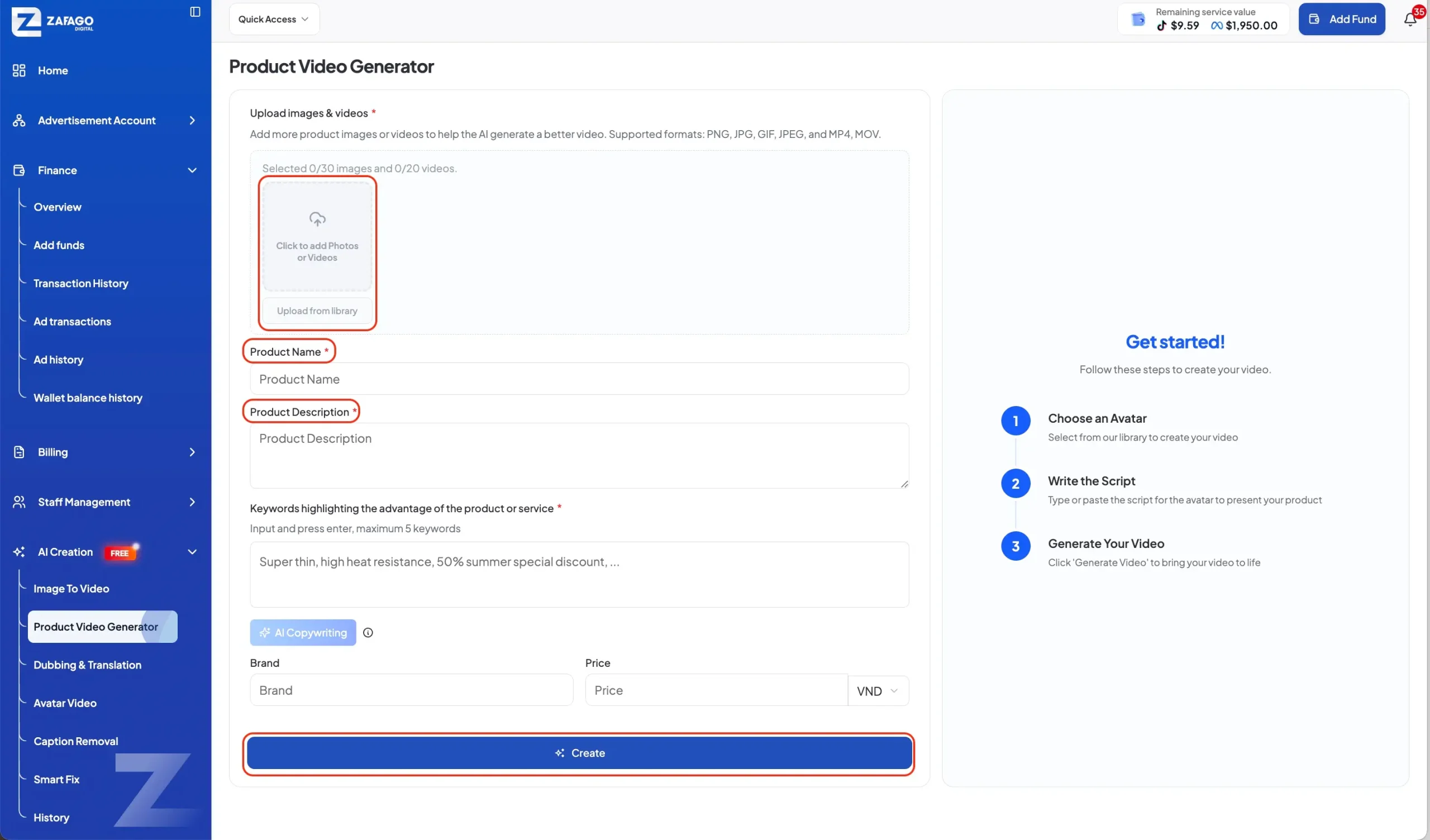
The first step is uploading the visual assets that Product Video AI will use to create the video. Zafago Portal accepts product media through the upload area, allowing users to provide existing images or videos before adding the written product information used in the next stage.
Open AI Creation from the Zafago Portal sidebar and select Product Video Generator.
At the top of the workspace, locate Upload images & videos. Add the product media you want the AI to use.
Rather than uploading every available asset, prioritize visuals that clearly show what the product looks like and what customers need to understand.
For an ecommerce product, this could include a clean product shot, a close-up showing material or details, an image demonstrating how the product is used, and lifestyle content showing the product in context.
Multiple useful perspectives give the generator more material to work with when constructing the video.
The interface also shows the selected media count, making it easier to check what has been added before moving forward.
Step 2 gives Product Video AI the right product information
Product information gives the AI context for building the video. Users can enter the Product Name, Product Description, important keywords or advantages, Brand, Price, and other available settings. More specific inputs help the generated content stay closer to the actual product and its intended marketing message.
Start with Product Name and Product Description.
The description does not need to become a full product page. Focus on what the product is, who it is relevant to, and the characteristics that should appear in the video.
The Keywords highlighting the advantage of the product or service field is particularly important because it tells the system which selling points deserve emphasis.
For example: Lightweight fabric, relaxed fit, breathable material, suitable for everyday wear.
These inputs are more useful than broad marketing phrases such as “amazing quality” because they describe actual product characteristics.
Zafago Portal also provides an AI Copywriting option. This can support the process of developing product messaging from the information provided rather than requiring every line to be prepared manually.
Users can additionally enter Brand and Price when those details are relevant to the intended video.
The goal is simple: give Product Video AI enough accurate context to understand what it is presenting without overwhelming the input with unnecessary information.
Step 3 customizes the video before generation
Zafago Portal lets users configure key video preferences before generation, including language, number of videos, video duration, subtitles, voice, and avatar-related options where available. These settings help adapt Product Video AI to different campaign formats, audiences, and content requirements without rebuilding the workflow from the beginning.
Select the Language that matches the audience for the video.
This is particularly relevant for international ecommerce and advertising teams. A product may be promoted across several markets, so language selection helps prepare creative content for the intended audience.
Next, review the available generation settings.
Users can select the number of videos they want to generate and choose an appropriate video duration. The interface also provides an Enable subtitle option.
Subtitles can be useful for short-form advertising because viewers may encounter the video without immediately listening to the audio.
The Choose a voice section lets users review the available voice option before generating the video. Depending on the selected workflow and available assets, avatar-related settings can also appear in the Product Video Generator.
These choices allow the same basic product information to support different creative requirements.
A brand testing several advertising angles, for example, does not necessarily need to restart traditional video production for every variation. Product Video AI provides another way to turn existing assets into testable creative material.
Step 4 creates and reviews the AI-powered product video
After the assets, product information, and video settings are ready, users can click “Create” to start generation. Zafago Portal processes the supplied inputs and creates the Product Video AI according to the selected configuration, while generated content can later be accessed through the History section of AI Creation.
Before clicking Create, review the inputs one final time.
Check that the product name is correct, the description reflects the actual product, the important selling points are specific, and the selected language matches the target market.
Then click Create at the bottom of the Product Video Generator.
The generation process can be summarized as:
Upload product assets → Add product information → Select video settings → Create
Once content has been generated, the History area in AI Creation provides a centralized place for generated projects and videos.
This is useful when teams produce multiple creative variations because previous outputs do not need to be managed as isolated files across different workflows.
Product Video Generator also sits alongside other Zafago Portal AI tools such as Image to Video, Dubbing & Translation, Avatar Video, Caption Removal, and Smart Fix.
That means a product video can form part of a broader creative workflow. An advertiser might generate product content, localize another video for a new market through Dubbing & Translation, or use Image to Video when only static creative assets are available.
For advertisers that also manage campaigns through Zafago, this AI workflow can connect naturally with Rent TikTok Agency Ad Account and TikTok Advertising Account Management, giving international teams access to both advertising account operations and creative tools within the wider Zafago ecosystem.
Product Video AI makes recurring ecommerce content easier to produce
Product Video AI is most useful when brands need a repeatable way to turn existing product information into new video content. Instead of treating every creative as a separate production project, ecommerce and advertising teams can use a structured workflow to prepare, generate, review, and organize product videos more efficiently.
The feature does not remove the need for creative strategy. Teams still need to decide which product benefit matters, what audience they want to reach, and which creative direction should be tested.
What changes is the production workflow.
A seller with product photography can use those existing assets as a starting point. A performance team can prepare different selling points for creative testing. An international advertiser can configure content for different language requirements.
This makes Product Video Generator especially relevant to businesses that need fresh creative regularly rather than a single polished brand video.
Within Zafago Portal, the feature also sits closer to the advertising workflow itself. Users can manage advertising accounts, financial activity, team access, and AI Creation from the same broader platform instead of treating creative generation as a completely disconnected task.
FAQ
Creating a Product Video AI in Zafago Portal follows a simple workflow: provide the product assets, describe the product accurately, select the relevant video settings, and start generation. Understanding what information the generator uses can help users prepare better inputs and make the feature easier to incorporate into regular content production.
Product Video AI works with existing product images and videos
Users can upload available product images and videos through the Product Video Generator interface and use them as source assets for the generation process.
Clear visuals that accurately represent the product provide a stronger starting point for the video.
Product Video AI uses descriptions and selling points as context
Product Name, Product Description, and keywords highlighting product advantages help the system understand what the generated video should communicate.
Specific product information is preferable to generic promotional language.
Product Video AI supports configurable language and video settings
The Product Video Generator includes settings for language, video quantity, duration, subtitles, voice, and other available creative options.
These controls make it easier to prepare content for different campaign requirements and markets.
Generated Product Video AI content can be managed in History
Zafago Portal includes a History section within AI Creation where generated projects can be reviewed and organized alongside other AI-created content.
This provides a more convenient workflow when a team creates multiple videos instead of generating each asset as an isolated project.
Product Video AI is part of the wider Zafago Portal AI Creation suite
Product Video Generator is one of several AI Creation tools available in Zafago Portal, alongside Image to Video, Dubbing & Translation, Avatar Video, Caption Removal, Smart Fix, and History.
Together, these tools give advertisers different ways to create, adapt, and manage video assets according to their campaign needs.
ZAFAGO GLOBAL – Digital Growth Partner
Zafago Global is a Performance Digital Marketing Agency dedicated to partnering with businesses to optimize strategies and drive sustainable revenue growth.