

How to Invite Employees to Zafago Portal and Assign Roles
Zafago Portal allows businesses and agencies to invite employees to their workspace and organize access through individual staff accounts. Instead of sharing one Portal login across a team, administrators can invite each employee by email, assign an appropriate role, and manage their access through Staff Management.
This feature is particularly useful for advertising operations involving media buyers, managers, finance teams, and other staff members who need different levels of access.
The invitation process can be completed directly from Staff List. Here is how it works.
Zafago Portal Staff Management keeps team access organized
Zafago Portal Staff Management provides a dedicated workspace for managing employees who have access to the Portal. Administrators can review staff information, check account status and assigned roles, invite new staff members, and use Permissions to create a clearer access structure for different responsibilities.
The Staff List displays important information about existing team members, including:
- Full Name
- Phone
- Status
- Role
Users can also search for staff members or filter the list by status. This provides a simple overview of who currently has access to the Portal before additional employees are invited.
Staff List provides direct access to employee invitations
To start the invitation process, log in to Zafago Portal and locate Staff Management in the left sidebar.
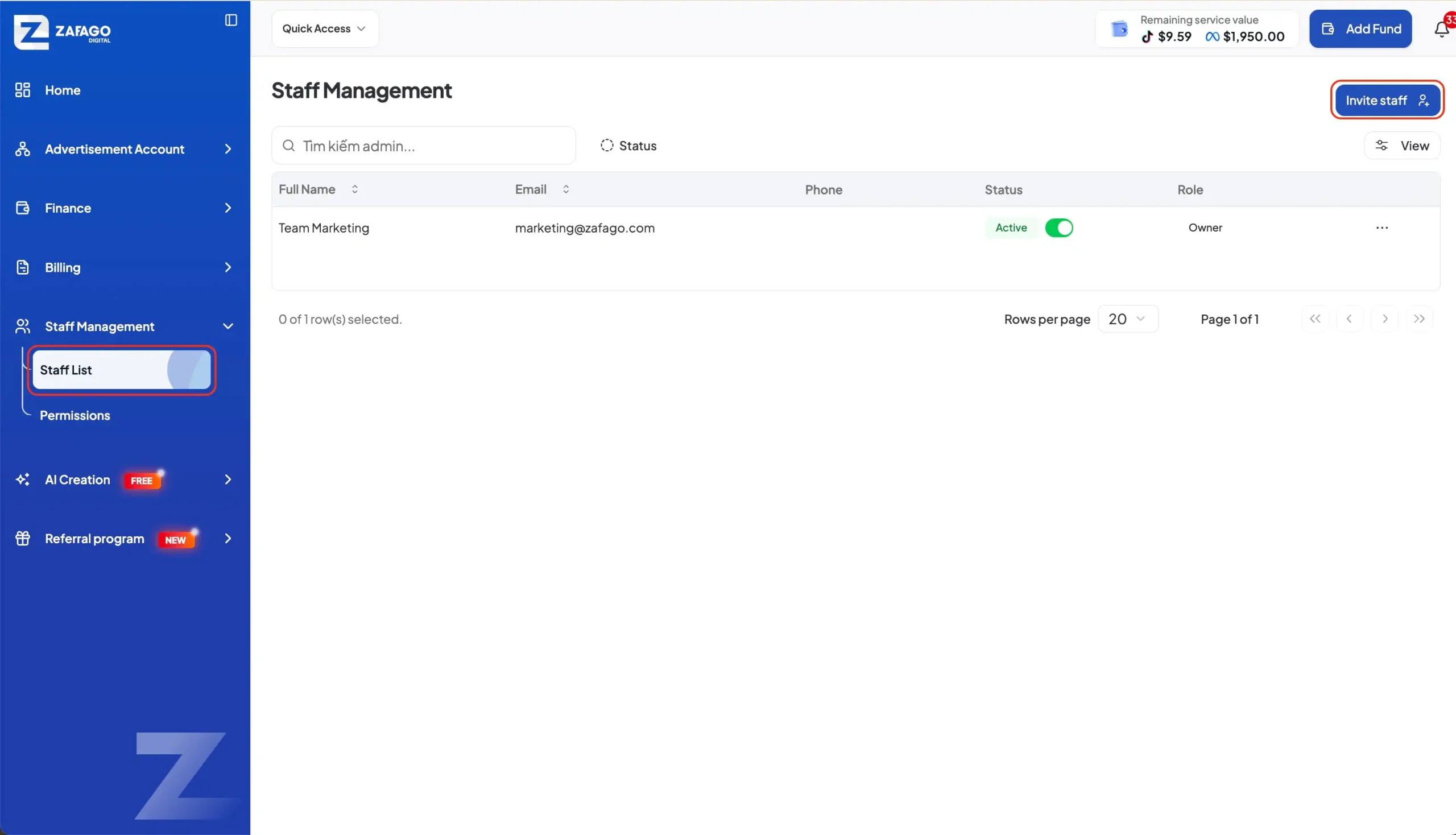
Select Staff List to open the staff management page. Existing staff accounts and their current status will appear here.
Click the Invite staff button in the upper-right corner to begin adding a new team member.
This keeps staff invitations within the same area used to review and manage existing Portal users.
Staff information and roles define the employee account
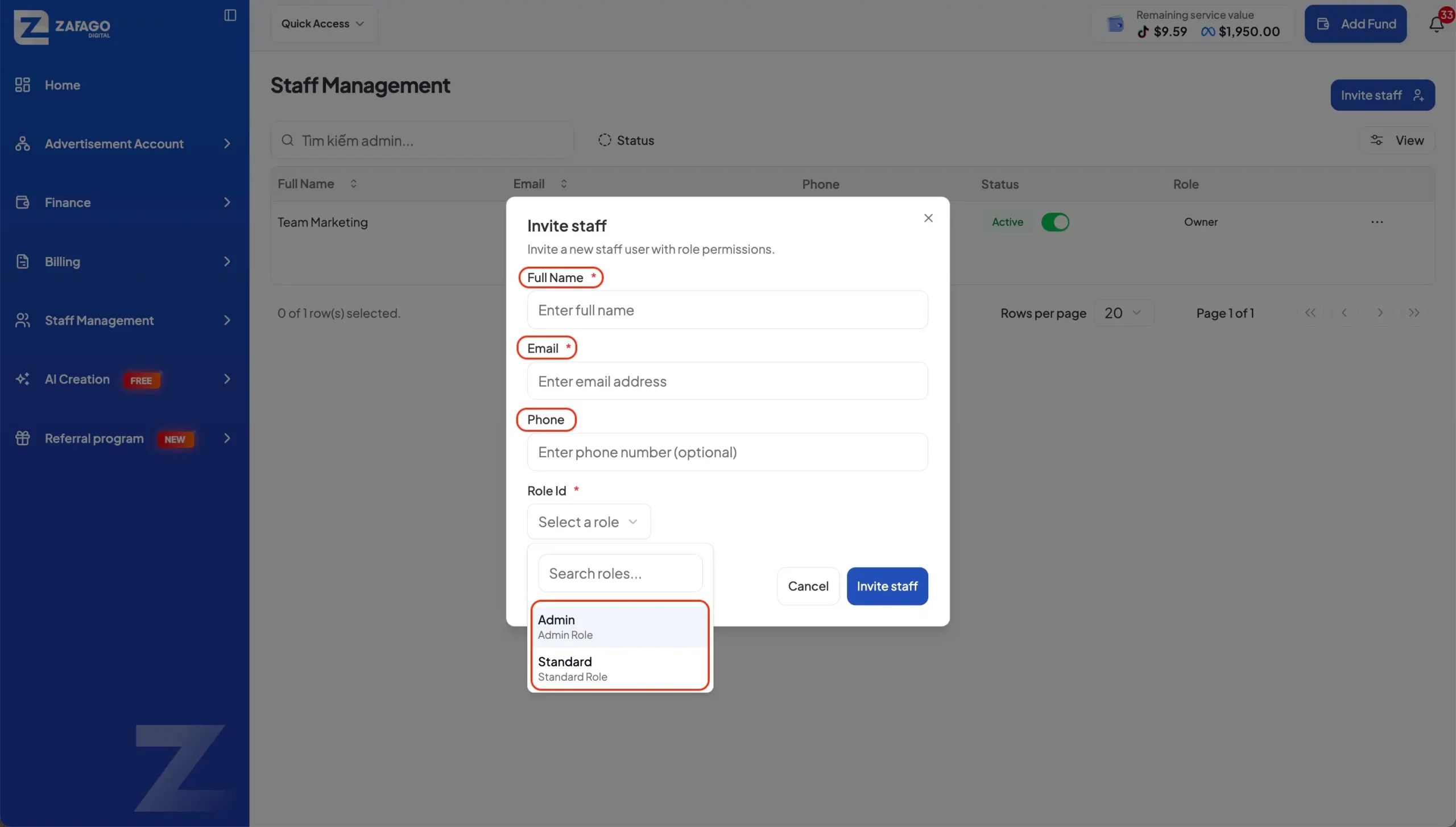
After selecting Invite staff, enter the required information for the employee and select the appropriate role for their account. The role should reflect what the employee needs to do inside Zafago Portal.
Role selection is an important part of the process because different team members may have different responsibilities.
For example, an advertising team may include people responsible for ad account operations, managers who require broader visibility, and finance staff working with financial activities.
If the selected role does not have permissions assigned, open Permissions under Staff Management and configure the required access first. Refer to the Zafago Portal Permission Creation Guide for detailed instructions.
Invite Staff sends the account activation email
Once the employee information and role have been reviewed, click Invite Staff. Zafago Portal will send a confirmation email to the email address entered during the invitation process.
The employee must then complete the account activation process.
They open the confirmation email, create a password for their Zafago Portal account, and click Activate Account.
After successful activation, the employee can log in to Zafago Portal with their own credentials.
The complete workflow is:
Staff Management → Staff List → Invite staff → Enter information → Select Role → Invite Staff → Confirmation Email → Create Password → Activate Account → Login
Zafago Portal roles support structured advertising operations
Individual staff accounts and role-based access help businesses organize Portal usage as their advertising operations grow. Rather than relying on shared credentials, team members can use their own accounts while administrators maintain a clearer view of staff status and roles.
This structure becomes especially useful for agencies and international advertisers managing multiple TikTok or Meta advertising accounts.
Businesses expanding these operations can also explore Rent TikTok Agency Ad Account as related Zafago Digital services.
Conclusion
Zafago Portal makes it easier to add team members while keeping access organized through individual accounts, roles, and permissions. With Staff Management, businesses can invite employees, control their access, and build a more structured workflow as their advertising operations and teams grow.
FAQ
Zafago Portal sends staff invitations through email
After the administrator clicks Invite Staff, a confirmation email is sent to the employee’s registered email address. The employee must use this email to continue the activation process.
Zafago Portal requires employees to activate their accounts
Invited employees create their own password and select Activate Account. They can log in to Zafago Portal after the activation has been completed successfully.
Zafago Portal Permissions control role access
If a role does not have the required permissions, administrators can access Staff Management → Permissions to configure them. This allows staff access to be organized according to different responsibilities within the Portal.
ZAFAGO GLOBAL – Digital Growth Partner
Zafago Global is a Performance Digital Marketing Agency dedicated to partnering with businesses to optimize strategies and drive sustainable revenue growth.