
Zafago Portal Login, Sign Up and Account Access Guide 2026
Zafago Portal is the account management platform that gives users one place to access advertising account management, finance, billing, staff permissions, AI Creation and other Zafago services. New users can register directly from the Portal, verify their email and sign in to start using the features available to their account.
Instead of working across separate tools for different operational tasks, users can use Zafago Ads Management Portal, also referred to as ZAMP, as a centralized workspace.
For new users, however, the first step is understanding how to find the correct Portal, create an account and complete email verification. This guide covers that entire journey, from the first Google search to securely logging out after using the platform.
Zafago Portal provides one access point for Zafago account management
Zafago Portal gives registered users access to a centralized environment for managing Zafago services. Depending on the account and permissions assigned, users can work with advertising accounts, financial activities, billing, staff management, AI Creation tools and other operational features without switching between multiple management interfaces.
The Portal is designed around a simple principle: users should be able to see and manage important advertising-related activities from one workspace.
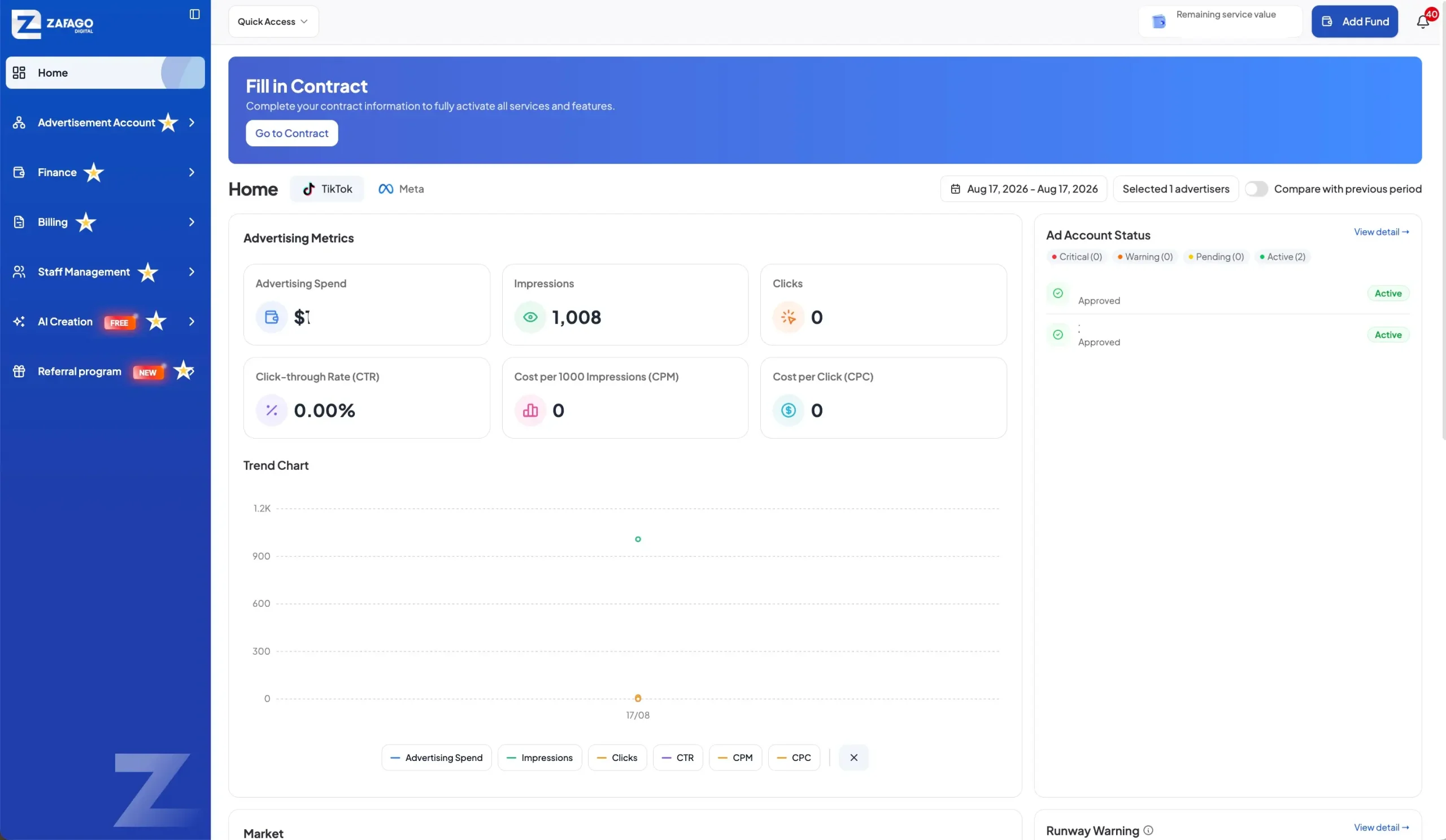
From the current Portal interface, major modules include:
- Advertisement Account
- Finance
- Billing
- Staff Management
- AI Creation
- Referral Program
For example, the Advertisement Account section provides access to TikTok Ad Account and Meta Ad Account management.
The Finance section brings together balance information, adding funds, transaction history, advertising account transactions, advertising history and wallet balance history.
AI Creation provides a different set of tools, including Image To Video, Product Video Generator, Dubbing & Translation, Avatar Video, Caption Removal and Smart Fix.
This means signing up for the Portal is not simply about creating another website account. It establishes the user’s access point to the Zafago management ecosystem.
For advertisers looking specifically for advertising account solutions, related services can also include Rent TikTok Agency Ad Account and TikTok Advertising Account Management.
Zafago Portal can be accessed from the official Portal page
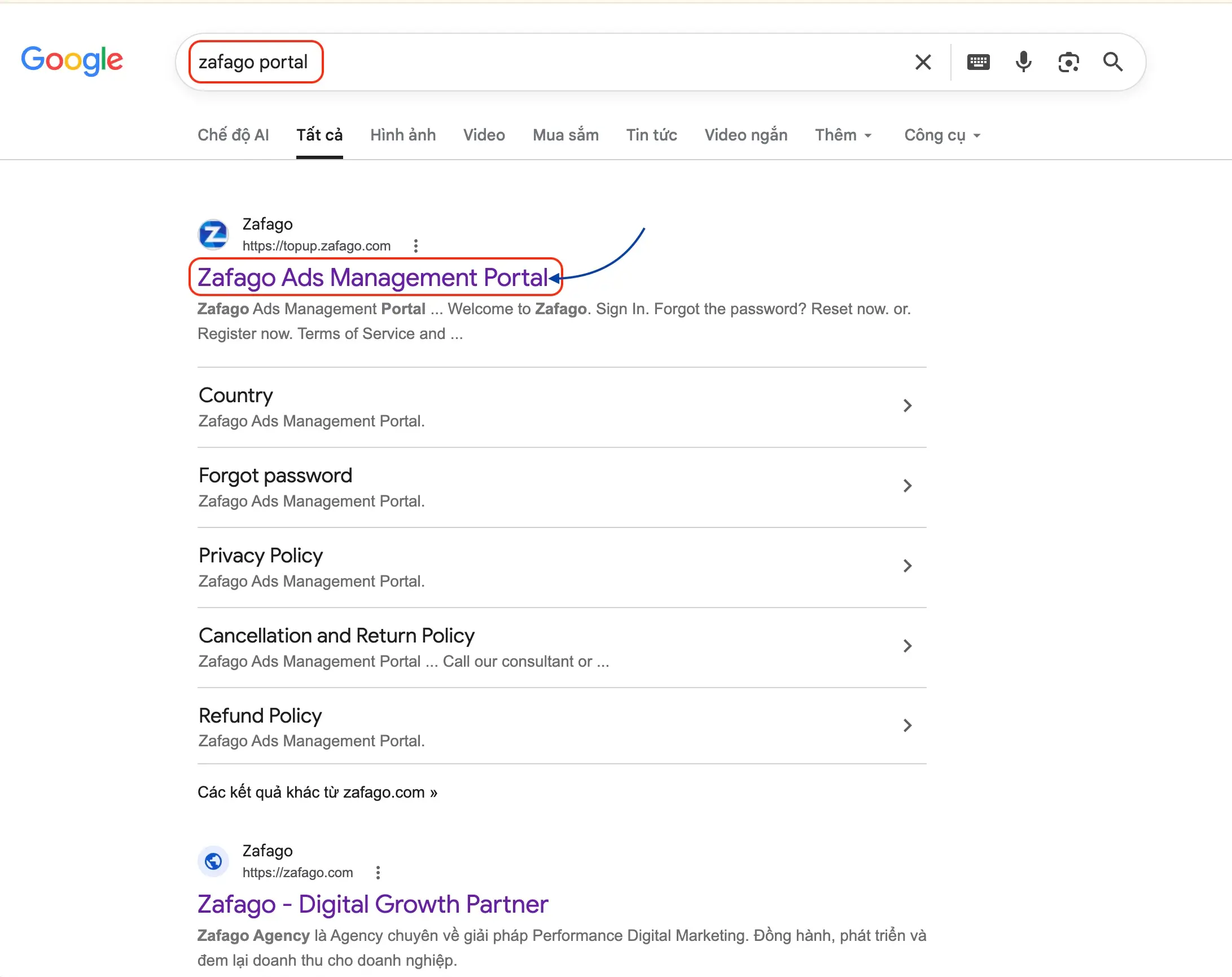
Users can find Zafago Ads Management Portal through Google Search or access the official Portal directly. When using Google, look for the result titled “Zafago Ads Management Portal” under the Zafago brand before entering account information or beginning the registration process.
A simple way for first-time users to locate the platform is to search:
Zafago Portal
Google may display Zafago Ads Management Portal as the branded result. This takes users to the Portal environment where the login and registration process begins.
This distinction is useful because Zafago’s main corporate website and the Zafago Ads Management Portal serve different purposes. The corporate website introduces Zafago and its services, while the Portal is the operational environment for registered users.
Zafago Portal login gives registered users access to their workspace
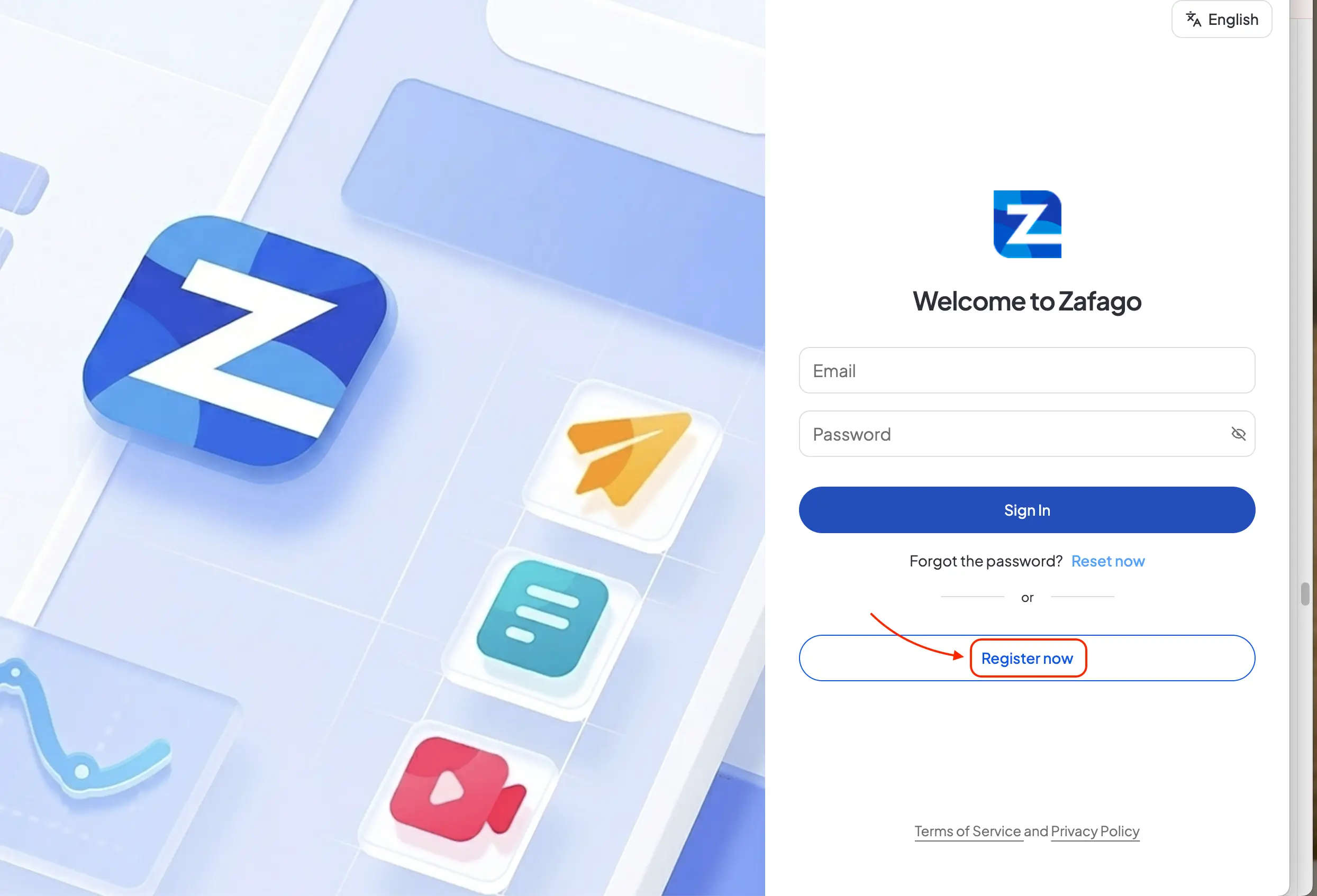
Registered users can complete the Zafago Portal login by entering the email address and password associated with their account and selecting Sign In. The same page also provides Reset now for password recovery and Register now for users who have not yet created a Zafago Portal account.
When the Portal opens, users arrive at the Welcome to Zafago screen.
The login interface contains two main fields:
Email – the email address associated with the Portal account.
Password – the password created for that account.
After entering both credentials, click Sign In.
The same screen also handles two common situations.
If you already have an account but cannot remember your password, select Reset now.
If you are using Zafago Portal for the first time and do not have an account, select Register now.
Zafago Portal sign up creates a new user account in a few steps
New users can complete Zafago Portal sign up by selecting Register now and entering the information requested on the registration page. The current form includes Full name, Country, Phone, Email, Password and Confirm password, together with a Referral code field for users who have a referral code to apply.
After selecting Register now, the Portal displays the Become a member of Zafago registration screen.
The process can be completed as follows.
Step 1: Enter your full name
Enter the full name that you want associated with the Portal account.
Accurate information makes the account easier to identify when working with the platform or communicating with the Zafago team.
Step 2: Select your country
Open the Country field and select the country associated with your account.
Country information is particularly relevant for advertisers working across international markets because advertising operations can involve different markets, currencies and account environments.
Step 3: Enter your phone number
Provide your current phone number.
Review the number before continuing so that incorrect contact information is not attached to the account.
Step 4: Enter an accessible email address
Enter an email address that you actively use.
This field is particularly important because the email becomes part of the Zafago Portal login credentials and is also used during the account verification process.
Make sure you can access the inbox before completing registration.
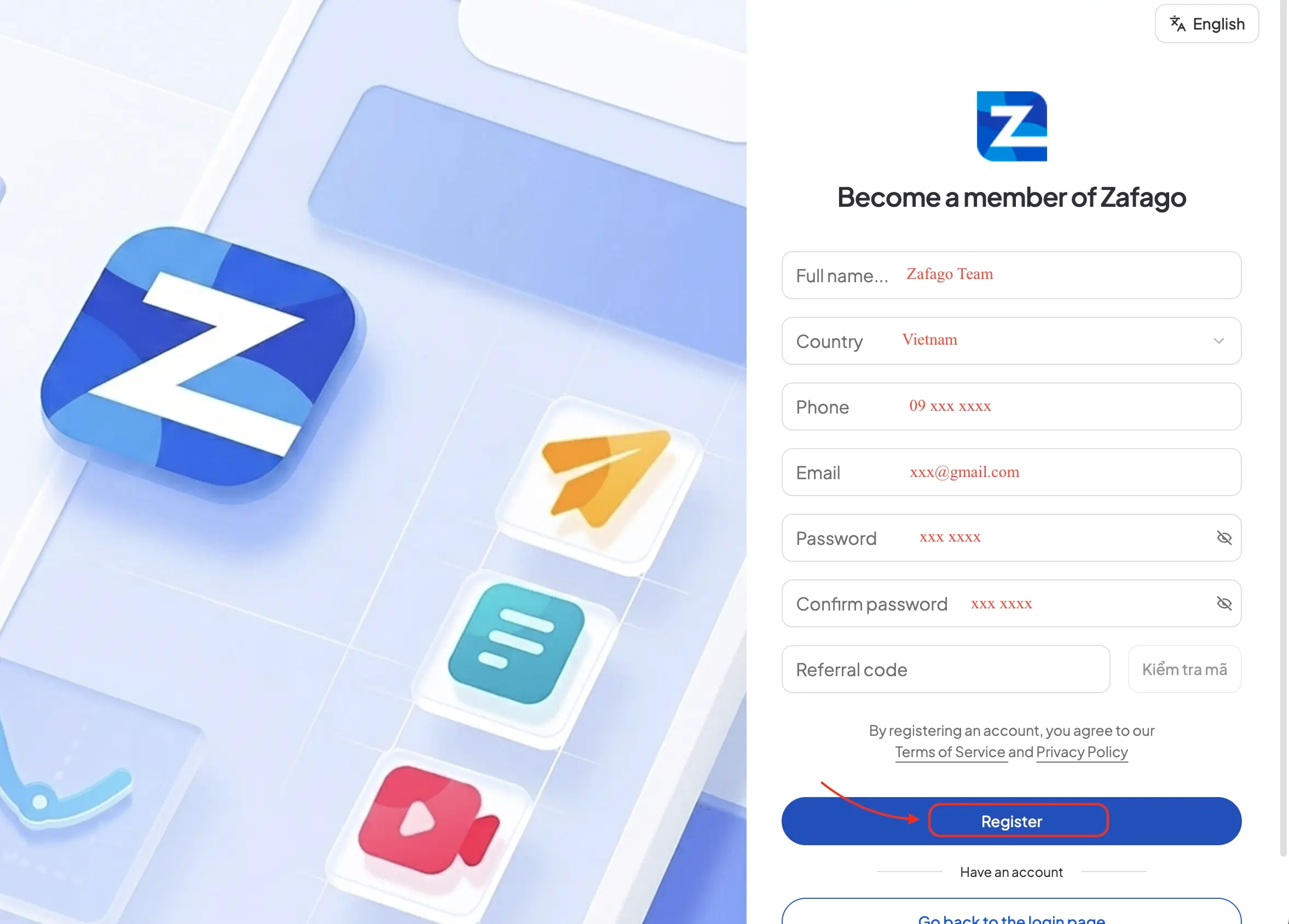
Step 5: Create your password
Enter the password you want to use in the Password field.
Then enter the same password again under Confirm password.
The two entries should match before submitting the registration form.
Step 6: Enter a referral code when applicable
The registration form also includes a Referral code field.
If you received a referral code, enter it in this section and use the available code-checking function before registration.
Step 7: Review the account information
Before continuing, review the information entered in the form, especially:
- Country
- Phone number
- Password confirmation
The registration page also informs users that by registering an account, they agree to the applicable Terms of Service and Privacy Policy.
Step 8: Select Register
Once the information has been checked, select Register.
The registration submission then moves the account to the verification stage.
Email verification activates the next stage of Zafago Portal access
After submitting the registration form, new users need to check the inbox associated with their registered email and complete email verification. Selecting Verify Email Address confirms the email used for registration, after which the user can return to the Portal and sign in using the newly created credentials.
Registration and login should be understood as separate stages.
The basic account flow is:
Register → Check email → Verify Email Address → Sign in now → Enter credentials → Sign In
After clicking Register, open the inbox for the email address used during registration.
Look for the account verification email and select Verify Email Address.
After successful verification, the confirmation screen provides the option to Sign in now. Select it to return to the Zafago login process.
This separation between registration, verification and authentication helps ensure that the email associated with the new account can actually be accessed by the user.
Zafago Portal logout securely ends the current user session
Zafago Portal logout allows users to end their current account session after completing their work. Logging out is especially recommended when accessing advertising accounts, financial information, billing data or staff management features from a shared computer or any device that other people may use.
To log out:
Step 1: Open the user profile menu
Click the user profile icon in the Portal interface.
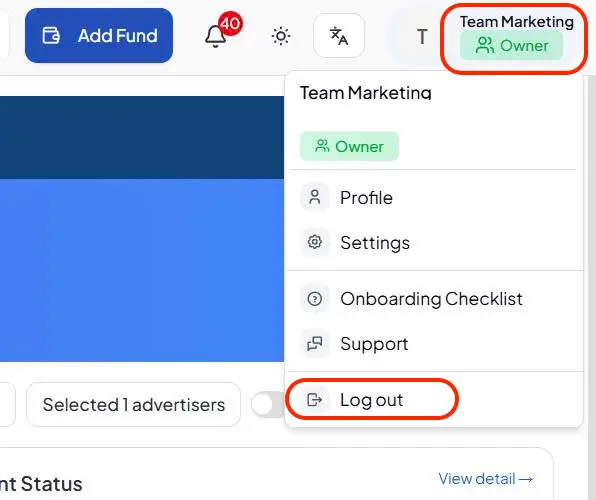
Step 2: Select Log out
Choose Log out from the available account options.
The current session will end and the user will need to authenticate again before accessing the account.
This simple step matters more for a business management platform than for an ordinary informational website. Portal access may expose advertising account data, financial records and internal management functions according to the user’s permissions.
Zafago Portal account access connects users with a broader advertising workflow
Creating a Zafago Portal account establishes a central access point for the platform’s advertising and operational features. After registration and email verification, users can sign in to access the modules available to them, manage relevant workflows, and return to the same Portal as their advertising activities expand.
For a first-time user, the entire process can be summarized as:
Find Zafago Portal → Register now → Complete account information → Register → Verify email → Sign in → Use Portal → Log out
Once inside, users can continue working across account management, finance, billing, staff permissions, AI-powered creative tools, and other operational features available within the Portal.
For international advertisers, Zafago Portal can also support broader advertising operations alongside services such as Rent TikTok Agency Ad Account and TikTok Advertising Account Management through Zafago Digital.
The key value is that Zafago Portal becomes the operational starting point for account access. One verified account gives users a consistent environment to manage the available tools, review advertising-related activities, and support more structured workflows as their operations grow.
Support is available whenever you need assistance
If you have any questions or encounter an issue while using Zafago Portal, go to the Support section and submit a support request. The Zafago support team is available to review your request, help identify the issue, and provide timely assistance so you can continue using the Portal smoothly.
FAQ
What is Zafago Portal?
Zafago Portal, or Zafago Ads Management Portal, is a management platform where registered users can access available Zafago features such as advertising account management, Finance, Billing, Staff Management, AI Creation and other operational functions.
How do I create a Zafago Portal account?
Open the Zafago Portal login page and select Register now. Complete the registration information, including your name, country, phone number, email and password, then select Register and complete email verification.
Do I need to verify my email after registration?
Yes. Based on the current registration flow, users need to check their registered email and select Verify Email Address before proceeding to sign in with the newly created account.
How do I log in to Zafago Portal?
Enter the email address and password associated with your verified account on the Welcome to Zafago screen and select Sign In.
What should I do if I forget my Zafago Portal password?
Select Reset now from the login page rather than creating another account. Follow the password recovery process to regain access to the existing account.
What can I access after logging in?
Available features depend on the user’s account and permissions. The current Portal interface includes areas such as Advertisement Account, Finance, Billing, Staff Management, AI Creation and Referral Program.
How do I log out of Zafago Portal?
Open the user profile menu and select Log out. Logging out is recommended after using the Portal on shared or public devices.
ZAFAGO Global – Digital Growth Partner
Zafago Global is a Performance Digital Marketing Agency dedicated to partnering with businesses to optimize strategies and drive sustainable revenue growth.
 Office: 21st Floor CMA Building 64 Connaught Road Central, Hong Kong 999077
 Hotline :(+84) 888-025-050
 Email: biz@zafagodigital.com